Showing posts with label ETL. Show all posts

Monday, August 5, 2019

Upserting a Data Vault Satellite in Azure SQL Data Warehouse using Data Factory and Databricks

     When doing data movement in Azure, the out of box solution is Data Factory....it is the EL in ELT. This works fine for moving data from your source systems into azure sql data warehouse (ASDW). In order to do transformations in Data Factory, you will either have to call stored procedures in ASDW, or use good ol' SSIS in your Data Factory pipeline. However; with the release of Data Flow, Microsoft has offered another way for you to transform data in Azure, which is really just Databricks under the hood. This allows for a nice GUI and drag and drop interface for your data transformations, however; this comes with a price. Everytime data factory kicks off a data flow, it has to spin up its own Databricks cluster to execute, which takes time. Multiply that with the number of data flows your DAG needs to run, and you can start to see where the problem is. Unfortunately, at the time of writing this, there is no option for you to simply use your own Databricks cluster to run these, negating the need for unnecessary spinning up of these clusters arbitrarily. Lucikly, if you like the speed that spark can add to your data pipelines, we can build these on our own using Databricks in Azure.

     First, we need to setup our Databricks cluster. Luckily this is pretty easy, a good walkthrough can be found here. Now that we have the Databricks cluster up and running, we need to generate an access token so that we can access this cluster from Data Factory, which can be done using these instructions. Now that we generated our acccess token, we can create a new linked service in Data Factory for this cluster using these instructions. In order for us to write data to ASDW we will use the SQL Data Warehouse connector for Azure Databricks. In order for this to work we will need to allow for Databricks to write to Blob Storage, which is used as temporary storage for the data being transferred between an Azure Databricks cluster and Azure SQL Data Warehouse, and whose configuration is detailed in the previous link.

     Ok now that we have our Databricks cluster configured, we need to set up some parameters for our Databricks notebook to use in order to connect to ASDW. We accomplish this through the use of environment variables in the cluster configuration. 


Figure 1. Databricks Cluster Configuration

     Under the configuration tab in your Databricks cluster there is a Spark tab that will allow you to enter your environment variables. By entering them here, all notebooks that run on this cluster can access them. Here we put in the username and password for ASDW, the ASDW fully qualified server name, the destination database name in ASDW, as well as all of the Blob storage information. You will need to restart the cluster for these to take effect.

     Ok, now we have our environment set up...we can now start coding. For this example I want to load data from a staging table to a data vault satellite table in ASDW. This represents the data set of a patient record containing an identifier (patient_id), and address attributes. The schema of the staging table looks like this:


CREATE TABLE [StageEmedsys].[Dev_Patient_]
(
 [patient_id] [decimal](10, 0) NULL,
 [address1] [varchar](30) NULL,
 [address2] [varchar](30) NULL,
 [city] [varchar](30) NULL,
 [state] [varchar](2) NULL,
 [zip] [varchar](10) NULL
)
WITH
(
 DISTRIBUTION = HASH ( [patient_id] ),
 CLUSTERED COLUMNSTORE INDEX
)
GO

     For the purposes of this example, we are assuming data has already been loading into this staging table, and there are no duplicate records. In the satellite we have the hashed patient_id (PatientKey), which allows us to join to the related patient hub, the load date, load process and source of the record, the hash of all of the satellite columns to do delta detection, and the relevant address columns. The target satellite table schema looks like this:


CREATE TABLE [raw].[SatPatientAddressEMED_TEST]
(
 [PatientKey] [varchar](64) NOT NULL,
 [LoadDate] [datetime] NOT NULL,
 [LoadProcess] [varchar](255) NOT NULL,
 [RecordSource] [varchar](255) NOT NULL,
 [HashDiff] [varchar](64) NOT NULL,
 [Address1] [varchar](30) NULL,
 [Address2] [varchar](30) NULL,
 [City] [varchar](30) NULL,
 [State] [varchar](2) NULL,
 [Zip] [varchar](10) NULL
)
WITH
(
 DISTRIBUTION = HASH ( [PatientKey] ),
 CLUSTERED COLUMNSTORE INDEX
)

     The PatientKey and the LoadDate compose the composite primary key of this satellite table. Now to load data from our staging table to our satellite, we create a Databricks notebook with the following Scala code: 


//Libraries
import org.apache.spark.sql.DataFrame
import org.apache.spark.sql.functions._
import org.apache.spark.sql.types._
import org.apache.spark.sql.Column
import spark.implicits._
import java.security.MessageDigest
import java.math.BigInteger

//Blob Storage info
val blobStorage = System.getenv("BLOB_STORAGE") val blobContainer = System.getenv("BLOB_CONTAINER") val blobAccessKey = System.getenv("BLOB_ACCESS_KEY") val tempDir = "wasbs://" + blobContainer + "@" + blobStorage +"/tempDirs" val acntInfo = "fs.azure.account.key."+ blobStorage

sc.hadoopConfiguration.set(acntInfo, blobAccessKey)

//Database Connectivity
val dwDatabase = System.getenv("DW_DATABASE")
val dwServer = System.getenv("DW_SERVER")
val dwUser = System.getenv("DW_USER")
val dwPass = System.getenv("DW_PASS")
val dwJdbcPort =  "1433"
val dwJdbcExtraOptions = "encrypt=true;trustServerCertificate=true;hostNameInCertificate=*.database.windows.net;loginTimeout=30;"
val sqlDwUrl = "jdbc:sqlserver://" + dwServer + ":" + dwJdbcPort + ";database=" + dwDatabase + ";user=" + dwUser+";password=" + dwPass + ";$dwJdbcExtraOptions"
val sqlDwUrlSmall = "jdbc:sqlserver://" + dwServer + ":" + dwJdbcPort + ";database=" + dwDatabase + ";user=" + dwUser+";password=" + dwPass
 
//Get parameters
dbutils.widgets.text("RecordSource", "","")
val recordS = dbutils.widgets.get("RecordSource")

dbutils.widgets.text("LoadProcess", "","")
val loadP = dbutils.widgets.get("LoadProcess")

dbutils.widgets.text("SourceSystem", "","")
val sourceS = dbutils.widgets.get("SourceSystem")

//Get dataset for data in staging table
var stagedData: DataFrame = spark.read
  .format("com.databricks.spark.sqldw")
  .option("url", sqlDwUrlSmall)
  .option("tempDir", tempDir)
  .option("forwardSparkAzureStorageCredentials", "true")
  .option("query", "select patient_id as SatelliteNaturalKey,[address1] as Address1,[address2] as Address2,[city] as City,[state] as State,[zip] as Zip,'0'+isnull([address1],'')+isnull([address2],'')+isnull([city],'')+isnull([state],'')+isnull([zip],'') as PreHashDiff, getdate() as LoadDate FROM [StageEmedsys].[Dev_Patient_]").load() 

//Get dataset for data in exising sat
val existingSat: DataFrame = spark.read
  .format("com.databricks.spark.sqldw")
  .option("url", sqlDwUrlSmall)
  .option("tempDir", tempDir)
  .option("forwardSparkAzureStorageCredentials", "true")
  .option("query", "select X.PatientKey as ExistingSatelliteKey,X.HashDiff as ExistingHashDiff from(Select C1.PatientKey,  C1.HashDiff,ROW_NUMBER() OVER (PARTITION BY C1.PatientKey ORDER BY LoadDate DESC) as RowNum from raw.SatPatientAddressEMED_TEST  C1)x where x.RowNum=1")
  .load()

//Hash function
val sha_256 = udf((s: String) => {MessageDigest.getInstance("SHA-256").digest(s.getBytes("UTF-8")).map("%02x".format(_)).mkString})

//Concat Function
val united = udf((s1: String, s2: String) =>  s1.concat(s2))

//Add additional columns
stagedData = stagedData.withColumn("SatelliteKey",sha_256(united(col("SatelliteNaturalKey"),lit(sourceS)))).withColumn("LoadProcess",lit(loadP)).withColumn("RecordSource",lit(recordS)).withColumn("HashDiff",sha_256(col("PreHashDiff")))                      
                                   
//Join and filter for new satellites, or satellites that have a different HashDiff
val dff = stagedData.join(existingSat, col("SatelliteKey")===col("ExistingSatelliteKey"), "left_outer").filter(existingSat.col("ExistingSatelliteKey").isNull ||  stagedData.col("HashDiff")=!=existingSat.col("ExistingHashDiff")).drop("SatelliteNaturalKey").drop("PreHashDiff").drop("ExistingSatelliteKey").select("SatelliteKey", "LoadDate", "LoadProcess", "RecordSource", "HashDiff", "Address1", "Address2", "City", "State", "Zip") 

//To write to ASDW
dff.write
   .format("com.databricks.spark.sqldw")
   .option("url", sqlDwUrlSmall)
   .option("forwardSparkAzureStorageCredentials", "true")
   .option("dbTable", "raw.SatPatientAddressEMED_TEST")
   .option("tempDir", tempDir)
   .mode("append")
   .save()

Ok lets break down this code block by block. The Libraries block is where we issue out import statements, for the libraries we need for the code in the notebook. This facilitates the work we do with spark dataframes and the udfs we want to work with.

The next block of code contains all of the information for connectivity to Blob storage. You'll notice each Scala variable makes use of the environment variables we defined earlier. After the Blob storage variables we see the code block for our connectivity to ASDW, once again making use of our environment variables. As you can see, I hardcoded the value of the port, but if you want to change it you can always include this in an environment variable as well.


Now that we have our connections defined, the next block of code handles input parameters via widgets. This will allow us to pass values from an Azure Data Factory pipeline to this notebook (which we will demonstrate later in this post). The parameters will pass information regarding the source system table the record came from (RecordSource), the unique identifier of the load process used to transform this data (LoadProcess), and the source system the record came from (SourceSystem).


In the code block labeled "Get dataset for data in staging table", we bring the data from the staging table into a dataframe in spark. In the SQL query we bring in all of the staging table fields, all of the fields concatenated as the PreHashDiff field, and the datetime of the execution of the query. The very next code block brings the PatientKey and the record hash, from the current records in the satellite table, into a spark dataframe. In this example I use a window function to determine the current version of a satellite record, but you can use any method that works for you in your particular case. Note, that if your ETL process hashes the PatientKey and HashDiff into the staging table, you can join your satellite to the staging table on PatientKey to reduce the number of records you have to pull from the satellite into spark. Either method has its pluses and minuses.


The next 2 lines contain our udfs we want to use with our dataframes. The first one, sha_256, we will use to get the SHA 256 hash for our PatientKey and HashDiff fields. The next udf we will use to concatenate the parameter values that are being passed in via Data Factory to the fields coming from the staging table. These concatenated values will be passed to the sha_256 udf to derive the HashDiff field.


In the next block of code, "Add additional columns", we add the parameters from Data Factory to our stagedData dataframe using the withColumn function, and generating our hash fields.


Now we can compare the datasets from the staging table and the satellite to determine deltas. For this we create a new dataframe call "dff" that will capture these deltas. We use the join function to left join the stagedData dataframe to the existingSat dataframe on SatelliteKey = ExistingSatelliteKey. We then apply the filter function to either keep records from stagedData that don't exist in existingSat, or where the record hashes differ. We then use the drop function to remove columns we don't need from the dataframe, and use the select function to project the columns from the dataframe in the order they are declared in the target satellite table.


With our dataframe of deltas ready to go, we can write to our target satellite table in ASDW in the "To write to ASDW" code block using the example detailed here. Note, we can properly parameterize this notebook so that we can use the same notebook for every satellite load, reducing the number of notebooks we have to maintain to load our satellites. We do this by changing 3 things with this notebook:


1. Add parameters for the queries to pull data from the staging table and from the satellite table.

2. Add a parameter for the target satellite table name used in the last block of code
3. Changed the staging query to contain columns that are in the same order as the target satellite table. We can do it in this example by changing the query to this:


select 
 patient_id as SatelliteNaturalKey,
        '' as SatelliteKey,
 getdate() as LoadDate,
 '' as LoadProcess,
 '' as RecordSource,
 '' as HashDiff,
 [address1] as Address1,
 [address2] as Address2,
 [city] as City,
 [state] as State,
 [zip] as Zip,
 '0'+isnull([address1],'')+isnull([address2],'')+isnull([city],'')+isnull([state],'')+isnull([zip],'') as PreHashDiff 
FROM 
 [StageEmedsys].[Dev_Patient_]

The code in the "Add additional columns" code block will replace the SatelliteKey, LoadProcess, RecordSource, and HashDiff blank values. Then you can remove the following from the code that creates the dff dataframe:


.select("SatelliteKey", "LoadDate", "LoadProcess", "RecordSource", "HashDiff", "Address1", "Address2", "City", "State", "Zip")

Ok finally, we need to create our Data Factory pipeline to call this notebook. A good walkthrough on how to do this can be found here. We start by creating a new pipeline, in this example we'll call it "SatExample". We drag a notebook activity onto the design surface and call it "Notebook_SatPatientAddressEMED_TEST":
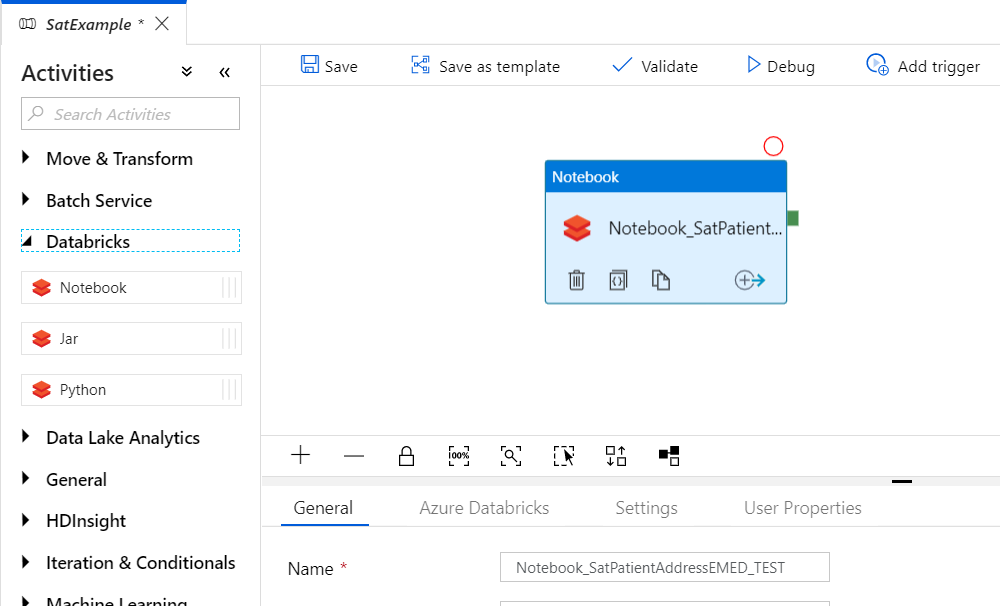
Figure 2. Azure Data Factory Notebook Activity
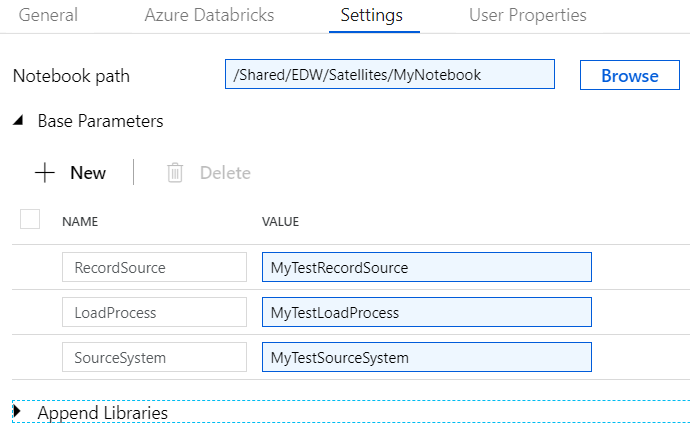
On the Azure Databricks tab, select the Databricks cluster you created. Next, on the Settings tab we enter the path to our notebook and the parameter values we want to pass to the notebook:

Figure 3. Azure Data Factory Notebook Activity Settings Tab

And...thats it! You are now ready to run spark ETL pipelines in your Azure instance!

Sunday, March 9, 2014

Inactivating a SCD Type 2 Persistent Staging Table Record, That Has Been Deleted in the Source System, Using a Dynamic Merge Statement in SQL Server 2012

     I've run into a few source systems that actually allow deletion of data, instead of simply setting an inactive date for the record. This can cause all types of havoc in both the source system and systems downstream that use that data. You can run into orphan records in your source system and inferred members in your data warehouse. You also want to expose this data as being deleted for both audit and reporting requirements. You may get business requests such as: When was this record deleted? I want to filter on records that are active (not deleted). If you don't have CDC enabled on the source system, and these records are just deleted, you may not be able to fulfill these 2 business requirements.

     In this post I'm going to be building upon the persistent staging post I made, and apply those concepts to set persistent staging records as inactive when they get deleted in the source system. Few caveats to make this work:

  • The staging load has to be a full load every time. This way we can look at what we have in persistent staging, compare to what is in staging and determine what is missing. You cannot have multiple versions of the same record in staging at the same time.
  • The stage table and the persistent stage table need to have the same name
  • The stage table and the persistent stage table need to have the same fields, with same names, except for the control fields in the persistent staging table. These control fields include:
    1. EffectiveStartDT (The datetime the record was valid from, defaults to 1/1/900)
    2. EffectiveExpireDT (The datetime the record was valid to, defaults to 1/1/4000)
    3. CurrentRowYN (A Y or N flag that determines whether or not the record is the current version)
    4. PSInsertDT (The datetime the record was inserted into the persistent staging table)
    5. Checksum (The binary checksum of the record, this will be compared against incoming data from staging to see if a record has changed)
  • The persistent staging table must have a primary key on a combination of the natural key(s), sometimes referred to as a business key) and the EffectiveStartDT.
  • None of the fields can be a BLOB i.e. ntext, text, image etc. since the binary_checksum function can't handle those data types. 
  • This is for daily changes. If you have multiple loads a day, with multiple changes in a single day, the record will simply be overwritten without doing a SCD type 2. (Essentially a SCD Type 1). So if it gets deleted and re-added in the same day the inactivate date record will be overwritten.
  • The staging database and the persistent staging database have to be on the same server
  • Both the persistent staging table and the staging table both need to have SourceInactiveDT field.

To dynamically generate the merge statement we're going to create a stored procedure that will read the metadata of the table, and auto generate the code for us. We can include this in the SSIS package we created for the loading of the persistent staging table:
Figure 1. Data Flow Task
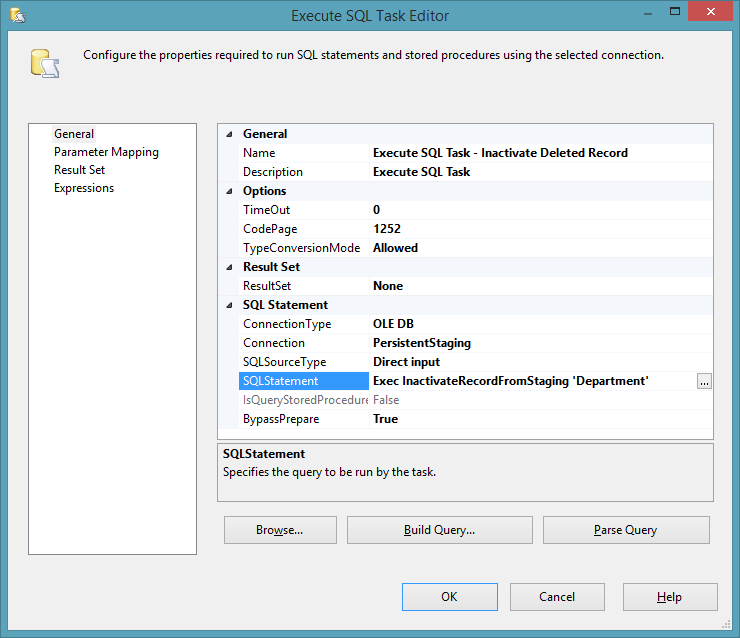
We call the stored procedure and pass as a parameter the name of the table we are staging. In this example the table Department:

Figure 2. Execute SQL Task
Now lets prep the data for the inactivation. If we use the data from the last post our data set looks like this:

select * from  [Source].[dbo].[Department]

Figure 3. Source System Data

select * from  [PersistentStaging].[dbo].[Department]

Figure 4. Persistent Staging Data


     In the previous post I changed the Help Desk location from Nashville to Cleveland. In this post lets delete the Help Desk record from the source system and run the package again with the addition of the inactivate stored procedure:

delete from [Source].[dbo].[Department] where DepartmentName='Help Desk'


We also need to make sure we add the SourceInactiveDT to both tables:

alter table
 [Staging].[dbo].[Department]
 add SourceInactiveDT datetime

 go

 alter table
 [PersistentStaging].[dbo].[Department]
 add SourceInactiveDT datetime

 go

Now lets run the package and see what happens in the persistent staging table:

Figure 5. Inactive Record Logged

Here we can see that the Help Desk record received a SourceInactiveDT when the stored procedure detected it wasn't present in the staging table.

Here is the code for the stored procedure to inactivate the record:


Use PersistentStaging
GO
IF OBJECT_ID('dbo.udfColumnsForBinaryChecksum') IS NOT NULL
begin
drop function [dbo].[udfColumnsForBinaryChecksum]
end
go

Create
 function [dbo].[udfColumnsForBinaryChecksum] ( @TableName varchar(100))
returns

 varchar(8000)
as

-- =========================================================================

-- Author: Jim Ferris http://dennysjymbo.blogspot.com/

-- Create date: 2014-02-28

-- Description: returns a comma seperated list of fields from a table for binary checksum input

-- Example: select dbo.udfColumnsForBinaryChecksum ('Department')

-- =========================================================================

begin

declare @returnValues varchar(8000)=' '
Select

 @returnValues = @returnValues +CHAR(10) + case when NUMERIC_PRECISION is not null then 'convert(varchar, '+ COLUMN_NAME +' ) ' else  COLUMN_NAME end + ','
FROM
INFORMATION_SCHEMA.COLUMNS
WHERE
TABLE_NAME = @TableName
AND COLUMN_NAME NOT IN
(
'EffectiveStartDT',
'EffectiveExpireDT',
'CurrentRowYN',
'PSInsertDT',
'CheckSum'
)
Set @returnValues=SUBSTRING( @returnValues,0,len(@returnValues))
return @returnValues;
end
go


CREATE PROCEDURE [dbo].[InactivateRecordFromStaging]
(@TableName AS varchar(100))
   
AS
--> =========================================================================
--> Author:        Jim Ferris http://dennysjymbo.blogspot.com/
--> Create date:   2014-02-27
--> Description:   Checks records in staging, compares to persistent staging, then
-->                sets the inactive date for records in persistent staging
-->                that don't exist in staging. Used only for staging that
-->                involves FULL loads and doesn't get a SourceInactivateDT
-->                from the source system
--> Example:       exec dbo.InactivateRecordFromStaging 'Department'
--> =========================================================================

-->SET NOCOUNT ON added to prevent extra result sets from interfering with SELECT statements.
            SET NOCOUNT ON;
-->Variable declarations
            DECLARE @DatabaseNameStage AS varchar(100) ='Staging',
                                  @DatabaseNamePstage AS varchar(100) ='PersistentStaging',
                                  @StagingOwner AS varchar(25) = 'dbo',
                                  @PersistentStagingOwner AS varchar(25) = 'dbo',
                    @LogTableName AS varchar(100),
                    @SQL_Statement AS nvarchar(max),
                    @StageTableName AS varchar(100),
                    @CurrentDateTime as datetime = sysdatetime(),
                    @Fields AS  varchar(max)=' ',
                    @TotalFields as varchar(max) =' ',
                    @Join as varchar(max) =' ',
                    @Source as varchar(max) =' ',
                    @Output as varchar(max) =' ' ,
                    @BOutput as varchar(max) =' ' ,
                    @Selection as  varchar(max) =' ',
                    @UpdateCount int,
                    @Primarykey varchar(250)=''

-->Initialize variables
            SET @LogTableName = @DatabaseNamePstage + '.'+@PersistentStagingOwner+'.' + @TableName
            SET @StageTableName = @DatabaseNameStage + '.'+@StagingOwner+'.' + @TableName

BEGIN TRY
   BEGIN TRAN
    SET XACT_ABORT ON

-->Returns a string of all fields in the table, minus the @Fields
            SELECT @TotalFields=@TotalFields + CHAR(10) + ' ' + COLUMN_NAME + ','
                FROM
                    INFORMATION_SCHEMA.COLUMNS
                WHERE
                    TABLE_NAME = @TableName
             AND COLUMN_NAME NOT IN
                        (
                        'EffectiveStartDT',
                        'EffectiveExpireDT',
                        'CurrentRowYN',
                        'PSInsertDT' ,
                        'Checksum',
                        'SourceInactiveDT'
                        )
           
             SET @TotalFields= @TotalFields + CHAR(10)+'SourceInactiveDT,'+ CHAR(10)+ 'EffectiveStartDT,'+ CHAR(10)+'EffectiveExpireDT,'+ CHAR(10)+'CurrentRowYN,'+ CHAR(10)+'PSInsertDT,'+ CHAR(10)+'CheckSum'


-->Returns a string of all fields minus the control fields in a table, minus the SourceInactiveDT
            SELECT @Fields = @Fields +CHAR(10) + ' ' + COLUMN_NAME + ','
                FROM
                     INFORMATION_SCHEMA.COLUMNS
                WHERE
                     TABLE_NAME = @TableName
                     AND COLUMN_NAME NOT IN
                        (
                        'EffectiveStartDT',
                        'EffectiveExpireDT',
                        'CurrentRowYN',
                        'PSInsertDT' ,
                        'SourceInactiveDT'
                        )
            SET @Fields=SUBSTRING( @Fields,0,len(@Fields)) + CHAR(10) 

-->Returns all the fields in the table minus the control fields, adding the source roleplaying identifier
         SELECT @Source = @Source +CHAR(10) + ' source.' + COLUMN_NAME + ','
                FROM
                     INFORMATION_SCHEMA.COLUMNS
                WHERE
                    TABLE_NAME = @TableName
                     AND COLUMN_NAME NOT IN
                        (
                        'EffectiveStartDT',
                        'EffectiveExpireDT',
                        'CurrentRowYN',
                        'PSInsertDT',
                        'CheckSum' ,
                        'SourceInactiveDT'
                        )
            SET @Source=SUBSTRING( @Source,0,len(@Source))+ CHAR(10) +'SourceInactiveDT,'   + CHAR(10) +',''1/1/1900'','+ CHAR(10) +'''1/1/4000'','+ CHAR(10) +'''Y'','+ CHAR(10) +''''+ convert(varchar,@CurrentDateTime,20)+''','+ CHAR(10) +'source.[Checksum]'+ CHAR(10)


-->Returns all fields for output binary checksum
         SELECT @BOutput = @BOutput +CHAR(10) + 'isnull( inserted.' + COLUMN_NAME + ',deleted.'+COLUMN_NAME +') ,'
                FROM
                     INFORMATION_SCHEMA.COLUMNS
                WHERE
                    TABLE_NAME = @TableName
                    AND COLUMN_NAME NOT IN
                        (
                        'EffectiveStartDT',
                        'EffectiveExpireDT',
                        'CurrentRowYN',
                        'PSInsertDT',
                        'CheckSum' ,
                        'SourceInactiveDT'
                        )
            SET @BOutput=SUBSTRING( @BOutput,0,len(@BOutput))  + CHAR(10)

-->Returns all the fields in a table, minus the control fields, with the addition of the values needed for an insert
         SELECT @Output = @Output +CHAR(10) + 'isnull( inserted.' + COLUMN_NAME + ',deleted.'+COLUMN_NAME +') as '+COLUMN_NAME+' ,'
                FROM
                     INFORMATION_SCHEMA.COLUMNS
                WHERE
                    TABLE_NAME = @TableName
                    AND COLUMN_NAME NOT IN
                        (
                        'EffectiveStartDT',
                        'EffectiveExpireDT',
                        'CurrentRowYN',
                        'PSInsertDT',
                        'CheckSum' ,
                        'SourceInactiveDT'
                        )
            SET @Output=SUBSTRING( @Output,0,len(@Output))  + CHAR(10) +',convert(date,sysdatetime()) as SourceInactiveDT,'+ CHAR(10) +'convert(date,sysdatetime()) as [EffectiveStartDT],'+ CHAR(10) +'''1/1/4000'' as [EffectiveExpireDT],'+ CHAR(10) +'''Y''as [CurrentRowYN],'+ CHAR(10) +''''+ convert(varchar,@CurrentDateTime)+''''+ ' as [PSInsertDT],'+ CHAR(10) +'binary_checksum('+SUBSTRING( @BOutput,0,len(@BOutput))+ CHAR(10) +','''+convert(varchar,@CurrentDateTime)+''') as CheckSum'+ CHAR(10)

-->Returns the join statement for the join between the staging and the persistent staging tables
        SELECT @Join =@Join + CHAR(10) + ' target.' + ccu.COLUMN_NAME + ' = source.' + ccu.COLUMN_NAME + ' AND'
               FROM
                    INFORMATION_SCHEMA.TABLE_CONSTRAINTS tc
                    JOIN INFORMATION_SCHEMA.CONSTRAINT_COLUMN_USAGE ccu ON tc.CONSTRAINT_NAME = ccu.Constraint_name
                    JOIN INFORMATION_SCHEMA.COLUMNS c ON ccu.TABLE_NAME = c.TABLE_NAME AND ccu.COLUMN_NAME = c.COLUMN_NAME
               WHERE
                    tc.CONSTRAINT_TYPE = 'Primary Key' and ccu.COLUMN_NAME <> 'EffectiveStartDT'
                    and ccu.TABLE_NAME = @TableName
            SET @Join =@Join + ' 1=1'

-->Returns the primary key of the persistent staging database table seperated by commas
        SELECT @Primarykey =@Primarykey +ccu.COLUMN_NAME + ','
               FROM
                    INFORMATION_SCHEMA.TABLE_CONSTRAINTS tc
                    JOIN INFORMATION_SCHEMA.CONSTRAINT_COLUMN_USAGE ccu ON tc.CONSTRAINT_NAME = ccu.Constraint_name
                    JOIN INFORMATION_SCHEMA.COLUMNS c ON ccu.TABLE_NAME = c.TABLE_NAME AND ccu.COLUMN_NAME = c.COLUMN_NAME
               WHERE
                    tc.CONSTRAINT_TYPE = 'Primary Key' and ccu.COLUMN_NAME <> 'EffectiveStartDT'
                    and ccu.TABLE_NAME = @TableName
          SET @Primarykey=SUBSTRING( @Primarykey,0,len(@Primarykey))  + CHAR(10)

-->Begin generating merge statement
            Select @SQL_Statement=convert(nvarchar(max), N'')
            + CHAR(10) + '-->Inserts an inactive record SCD type 2'
            + CHAR(10) + 'SET NOCOUNT ON;'
            + CHAR(10) + 'SET XACT_ABORT ON '
            + CHAR(10) + 'Declare @counter int=0'
            + CHAR(10) + 'select @counter=count(*) from ' +@StageTableName

            + CHAR(10) + '-->Temp table to hold deleted primary keys'

            + CHAR(10) + '-->If we have records in staging we compare persistent staging to staging on natural keys'
            + CHAR(10) + 'if @counter>0'
            + CHAR(10) + 'INSERT INTO'
            + CHAR(10) + ' ' + @LogTableName
            + CHAR(10) + '('
            + CHAR(10) + @TotalFields +')'
            + CHAR(10) + 'SELECT '
            + CHAR(10) + @TotalFields
            + CHAR(10) + 'FROM'
            + CHAR(10) + '('
            + CHAR(10) + 'MERGE  '+@LogTableName+' AS target'
            + CHAR(10) + ' USING ('
            + CHAR(10) + 'SELECT'
            + CHAR(10) + @Primarykey + CHAR(10) 
            + CHAR(10) +' FROM '+@StageTableName+' with (nolock)) As source'
            + CHAR(10) + '('
            + CHAR(10) + @Primarykey
            + CHAR(10) + ')'
            + CHAR(10) + ' ON'
            + CHAR(10) + '('
            + CHAR(10) + @Join +')'
            + CHAR(10) + '-->If delete in source occurs we deactivate the previous record'
            + CHAR(10) + 'WHEN NOT MATCHED BY SOURCE and target.CurrentRowYN=''Y'' and target.SourceInactiveDT is null and [EffectiveStartDT] <> convert(date,sysdatetime()) THEN'
            + CHAR(10) + 'update set  [EffectiveExpireDT] =dateadd(ms,-3,dateadd(day,1,DATEADD(dd, DATEDIFF(dd,0,sysdatetime()), -1))),[CurrentRowYN]=''N'''
            + CHAR(10) + '-->If delete occurs and its on the same day as previous non-delete change, we update current record'
            + CHAR(10) + 'WHEN NOT MATCHED BY SOURCE and target.CurrentRowYN=''Y'' and target.SourceInactiveDT is null and [EffectiveStartDT]=convert(date,sysdatetime())THEN'
            + CHAR(10) + 'delete'
            + CHAR(10) + '-->Output updated records'
            + CHAR(10) + 'output '+@Output
            + CHAR(10) + ') as data ( '
            + CHAR(10) + @TotalFields
            + CHAR(10) + ');'
            + CHAR(10) + 'SELECT @UpdateCount=@@ROWCOUNT;'

-->Run dynamic SQL and return the number of updated/inserted records
            EXEC sp_executesql @SQL_Statement,N'@UpdateCount int OUTPUT', @UpdateCount OUTPUT;

            SELECT @UpdateCount as DeleteCount

         --print @sql_statement

COMMIT TRAN
    END TRY
        BEGIN CATCH
            IF XACT_STATE() = -1
            ROLLBACK
            --SELECT   error_number() As ErrorNumber,
            --error_line() As ErrorLine,
            --convert(varchar(12), error_line()) + ', with error number ' + convert(varchar(12), error_number()) + ': ' + ERROR_MESSAGE()
           RAISERROR (N'Error has occurred %s %d.', -- Message text.
           10, -- Severity,
           1, -- State,
           N'number', -- First argument.
           5); -- Second argument.
            THROW
    END CATCH;