Showing posts with label sql server. Show all posts

Saturday, July 8, 2017

Using SQL Server Change Tracking with Streamset's Data Collector Kudu Destination

     Just started using Apache Kudu for a few projects that require near-real time data, as well as for our ETL logging for analytics. It's a really great storage engine if you like working with relational data, and if you can get around the limitations. My favorite thing about it is that not only can you interact with Kudu tables using Impala and SQL, but it also has an API that allows you insert/update/delete/upsert to tables directly. This means I can send data to Kudu with instructions on what to do with that data. So for traditional data warehousing, you would most likely send your deltas to a staging table before running batched upserts into the destination table to get it in synch with the source system. With Kudu you could still do this, but due to the Java API and Streamsets Data Collector, there really is no need to. 

     In Streamsets Data Collector they have a Kudu Destination that takes advantage of the Java API to load data. This is tightly coupled with the CDC feature they have on their JDBC Origin. The way this works is that the CDC operations like:

1 for INSERT
2 for DELETE
3 for UPDATE
4 for UPSERT

are assigned to the Data Collector header variable sdc.operation.type which in turn tells the Kudu destination what to do with the data. Unfortunately for some of us change tracking users the operation codes come in as I, D or U. So in order for us to take advantage of Kudu, we're going to have to translate these change tracking operations and get that assigned to the header variable.

     Before we dive into how we do this I wanted to list a couple of gotchas I ran into while using Data Collector with Kudu. Unlike a Hive destination that has the Hive Metadata Processor, the Kudu destination has no equivalent and will not create the table for you. You will have to create the table in advance of kicking off the pipeline or it will fail. Kudu will not accept your datetime data types from SQL Server, you will have to get the Unix epoch representation and store them in a bigint. I will demonstrate how to do this. Make sure the Max Batch Size (Records) on the JDBC origin does not exceed the Mutation Buffer Space (records) on the Kudu Destination or the pipeline will fail.

     Ok, for this example we will use a pipeline that looks like this:


Figure 1. JDBC to Kudu Pipeline

For the JDBC Origin make sure that:

    -The Incremental Mode checkbox is checked
    -Initial Offset is set to 0
    -The Offset Column is set to sys_change_version

The source query is going to pull from this table:


Figure 2. Source System Table

using this query:

DECLARE @offset INT =${offset} 
DECLARE @unixepoch2 datetime2 = '1970-01-01 00:00:00.0000' 
IF (@offset =0 OR @offset IS NULL) 
   SELECT 
        sct.abn_note_id AS abn_note_id, 
        sct.line AS line, 
        sct.cm_log_owner_id AS cm_log_owner_id, 
        sct.cm_phy_owner_id AS cm_phy_owner_id, 
        sct.order_id AS order_id, 
 ((cast (datediff(day,@unixepoch2,sct.abn_check_from_date) AS float) * 86400) + (cast(datediff(millisecond,dateadd(day,datediff(day,@unixepoch2,sct.abn_check_from_date),@unixepoch2),sct.abn_check_from_date) AS float ) / 1000))*1000 AS abn_check_from_date,
        c.sys_change_version AS sys_change_version, 
        'I' AS sys_change_operation 
FROM 
        dbo.abn_orders sct 
CROSS APPLY (
   SELECT 
        coalesce(max(sys_change_version), 0) AS sys_change_version 
    FROM 
        changetable(changes dbo.abn_orders, 0) c) AS c 
ELSE 
   SELECT 
        ct.abn_note_id AS abn_note_id, 
        ct.line AS line, 
        sct.cm_log_owner_id AS cm_log_owner_id,                                            sct.cm_phy_owner_id AS cm_phy_owner_id, 
        sct.order_id AS order_id,
((cast (datediff(day,@unixepoch2,sct.abn_check_from_date) AS float) * 86400) + (cast(datediff(millisecond,dateadd(day,datediff(day,@unixepoch2,sct.abn_check_from_date),@unixepoch2),sct.abn_check_from_date) AS float ) / 1000))*1000 AS abn_check_from_date, 
        sys_change_version AS sys_change_version, 
        sys_change_operation AS sys_change_operation 
  FROM 
        dbo.abn_orders AS sct 
   RIGHT OUTER JOIN changetable(changes dbo.abn_orders, ${offset}) AS ct 
   ON ct.abn_note_id = sct.abn_note_id AND ct.line = sct.line 
  WHERE 
        sys_change_version > ${offset} 
  ORDER BY 
        sys_change_version 

     In this query you can see we are using an if - else statement. The first part of the if is used when the offset is 0, thus triggering an initial load from the table and grabbing the latest offset to store in Data Collector. The reason we have to do this is to protect ourselves if we are loading this data from outside the change tracking retention window, or change tracking was not enabled from the table's inception. After the else is used for delta loading. This will pull data from the table since the last recorded offset. Pro tip...if you are using incremental pipelines make sure to periodically backup /var/lib/sdc/data on your Data Collector server in order to save the offset states of your pipelines. Can definitely come in handy when disaster strikes.

     You will also notice the functions we apply to the abn_check_from_date field. This is to convert the SQL Server datetime to a unix epoch with millisecond precision that we can store in a bigint column over in the Kudu destination table. We can later throw a view on top of this value to display it as a timestamp in Hive/Impala.

     Now that we took care of the JDBC origin, we need to take care of setting the header variable in order to tell Kudu what to do with our record(s) coming through the pipeline. We can accomplish this using a Javascript Evaluator processor. In the script textarea put:

//Loop through columns
for (var i = 0; i < records.length; i++) {
 try {
  //We either delete
  if (records[i].value.sys_change_operation == "D") {
   records[i].attributes['sdc.operation.type'] = '2'
  }
  //Or we upsert
  else {
   records[i].attributes['sdc.operation.type'] = '4'
  }

  // Write record to processor output
  output.write(records[i]);
 } catch (e) {
  // Send record to error
  error.write(records[i], e);
 }

}

     You can see that if the operation is "D" we set the header variable to 2, else we set it to 4 for an upsert. I did that for simplicity sake, you can change this to add cases specifically for inserts and updates if need be.

     That's it! You now have an incremental pipeline that takes advantage of SQL Server Change Tracking and Kudu. The devs over at Streamsets have promised that they will support Change Tracking natively in a future release, but for now this solution will get you by.


Sunday, March 9, 2014

Inactivating a SCD Type 2 Persistent Staging Table Record, That Has Been Deleted in the Source System, Using a Dynamic Merge Statement in SQL Server 2012

     I've run into a few source systems that actually allow deletion of data, instead of simply setting an inactive date for the record. This can cause all types of havoc in both the source system and systems downstream that use that data. You can run into orphan records in your source system and inferred members in your data warehouse. You also want to expose this data as being deleted for both audit and reporting requirements. You may get business requests such as: When was this record deleted? I want to filter on records that are active (not deleted). If you don't have CDC enabled on the source system, and these records are just deleted, you may not be able to fulfill these 2 business requirements.

     In this post I'm going to be building upon the persistent staging post I made, and apply those concepts to set persistent staging records as inactive when they get deleted in the source system. Few caveats to make this work:

  • The staging load has to be a full load every time. This way we can look at what we have in persistent staging, compare to what is in staging and determine what is missing. You cannot have multiple versions of the same record in staging at the same time.
  • The stage table and the persistent stage table need to have the same name
  • The stage table and the persistent stage table need to have the same fields, with same names, except for the control fields in the persistent staging table. These control fields include:
    1. EffectiveStartDT (The datetime the record was valid from, defaults to 1/1/900)
    2. EffectiveExpireDT (The datetime the record was valid to, defaults to 1/1/4000)
    3. CurrentRowYN (A Y or N flag that determines whether or not the record is the current version)
    4. PSInsertDT (The datetime the record was inserted into the persistent staging table)
    5. Checksum (The binary checksum of the record, this will be compared against incoming data from staging to see if a record has changed)
  • The persistent staging table must have a primary key on a combination of the natural key(s), sometimes referred to as a business key) and the EffectiveStartDT.
  • None of the fields can be a BLOB i.e. ntext, text, image etc. since the binary_checksum function can't handle those data types. 
  • This is for daily changes. If you have multiple loads a day, with multiple changes in a single day, the record will simply be overwritten without doing a SCD type 2. (Essentially a SCD Type 1). So if it gets deleted and re-added in the same day the inactivate date record will be overwritten.
  • The staging database and the persistent staging database have to be on the same server
  • Both the persistent staging table and the staging table both need to have SourceInactiveDT field.

To dynamically generate the merge statement we're going to create a stored procedure that will read the metadata of the table, and auto generate the code for us. We can include this in the SSIS package we created for the loading of the persistent staging table:
Figure 1. Data Flow Task
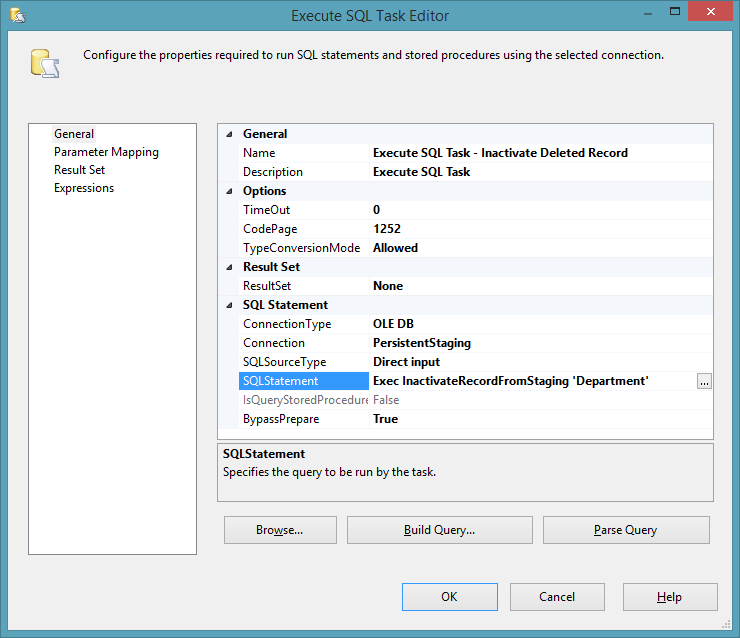
We call the stored procedure and pass as a parameter the name of the table we are staging. In this example the table Department:

Figure 2. Execute SQL Task
Now lets prep the data for the inactivation. If we use the data from the last post our data set looks like this:

select * from  [Source].[dbo].[Department]

Figure 3. Source System Data

select * from  [PersistentStaging].[dbo].[Department]

Figure 4. Persistent Staging Data


     In the previous post I changed the Help Desk location from Nashville to Cleveland. In this post lets delete the Help Desk record from the source system and run the package again with the addition of the inactivate stored procedure:

delete from [Source].[dbo].[Department] where DepartmentName='Help Desk'


We also need to make sure we add the SourceInactiveDT to both tables:

alter table
 [Staging].[dbo].[Department]
 add SourceInactiveDT datetime

 go

 alter table
 [PersistentStaging].[dbo].[Department]
 add SourceInactiveDT datetime

 go

Now lets run the package and see what happens in the persistent staging table:

Figure 5. Inactive Record Logged

Here we can see that the Help Desk record received a SourceInactiveDT when the stored procedure detected it wasn't present in the staging table.

Here is the code for the stored procedure to inactivate the record:


Use PersistentStaging
GO
IF OBJECT_ID('dbo.udfColumnsForBinaryChecksum') IS NOT NULL
begin
drop function [dbo].[udfColumnsForBinaryChecksum]
end
go

Create
 function [dbo].[udfColumnsForBinaryChecksum] ( @TableName varchar(100))
returns

 varchar(8000)
as

-- =========================================================================

-- Author: Jim Ferris http://dennysjymbo.blogspot.com/

-- Create date: 2014-02-28

-- Description: returns a comma seperated list of fields from a table for binary checksum input

-- Example: select dbo.udfColumnsForBinaryChecksum ('Department')

-- =========================================================================

begin

declare @returnValues varchar(8000)=' '
Select

 @returnValues = @returnValues +CHAR(10) + case when NUMERIC_PRECISION is not null then 'convert(varchar, '+ COLUMN_NAME +' ) ' else  COLUMN_NAME end + ','
FROM
INFORMATION_SCHEMA.COLUMNS
WHERE
TABLE_NAME = @TableName
AND COLUMN_NAME NOT IN
(
'EffectiveStartDT',
'EffectiveExpireDT',
'CurrentRowYN',
'PSInsertDT',
'CheckSum'
)
Set @returnValues=SUBSTRING( @returnValues,0,len(@returnValues))
return @returnValues;
end
go


CREATE PROCEDURE [dbo].[InactivateRecordFromStaging]
(@TableName AS varchar(100))
   
AS
--> =========================================================================
--> Author:        Jim Ferris http://dennysjymbo.blogspot.com/
--> Create date:   2014-02-27
--> Description:   Checks records in staging, compares to persistent staging, then
-->                sets the inactive date for records in persistent staging
-->                that don't exist in staging. Used only for staging that
-->                involves FULL loads and doesn't get a SourceInactivateDT
-->                from the source system
--> Example:       exec dbo.InactivateRecordFromStaging 'Department'
--> =========================================================================

-->SET NOCOUNT ON added to prevent extra result sets from interfering with SELECT statements.
            SET NOCOUNT ON;
-->Variable declarations
            DECLARE @DatabaseNameStage AS varchar(100) ='Staging',
                                  @DatabaseNamePstage AS varchar(100) ='PersistentStaging',
                                  @StagingOwner AS varchar(25) = 'dbo',
                                  @PersistentStagingOwner AS varchar(25) = 'dbo',
                    @LogTableName AS varchar(100),
                    @SQL_Statement AS nvarchar(max),
                    @StageTableName AS varchar(100),
                    @CurrentDateTime as datetime = sysdatetime(),
                    @Fields AS  varchar(max)=' ',
                    @TotalFields as varchar(max) =' ',
                    @Join as varchar(max) =' ',
                    @Source as varchar(max) =' ',
                    @Output as varchar(max) =' ' ,
                    @BOutput as varchar(max) =' ' ,
                    @Selection as  varchar(max) =' ',
                    @UpdateCount int,
                    @Primarykey varchar(250)=''

-->Initialize variables
            SET @LogTableName = @DatabaseNamePstage + '.'+@PersistentStagingOwner+'.' + @TableName
            SET @StageTableName = @DatabaseNameStage + '.'+@StagingOwner+'.' + @TableName

BEGIN TRY
   BEGIN TRAN
    SET XACT_ABORT ON

-->Returns a string of all fields in the table, minus the @Fields
            SELECT @TotalFields=@TotalFields + CHAR(10) + ' ' + COLUMN_NAME + ','
                FROM
                    INFORMATION_SCHEMA.COLUMNS
                WHERE
                    TABLE_NAME = @TableName
             AND COLUMN_NAME NOT IN
                        (
                        'EffectiveStartDT',
                        'EffectiveExpireDT',
                        'CurrentRowYN',
                        'PSInsertDT' ,
                        'Checksum',
                        'SourceInactiveDT'
                        )
           
             SET @TotalFields= @TotalFields + CHAR(10)+'SourceInactiveDT,'+ CHAR(10)+ 'EffectiveStartDT,'+ CHAR(10)+'EffectiveExpireDT,'+ CHAR(10)+'CurrentRowYN,'+ CHAR(10)+'PSInsertDT,'+ CHAR(10)+'CheckSum'


-->Returns a string of all fields minus the control fields in a table, minus the SourceInactiveDT
            SELECT @Fields = @Fields +CHAR(10) + ' ' + COLUMN_NAME + ','
                FROM
                     INFORMATION_SCHEMA.COLUMNS
                WHERE
                     TABLE_NAME = @TableName
                     AND COLUMN_NAME NOT IN
                        (
                        'EffectiveStartDT',
                        'EffectiveExpireDT',
                        'CurrentRowYN',
                        'PSInsertDT' ,
                        'SourceInactiveDT'
                        )
            SET @Fields=SUBSTRING( @Fields,0,len(@Fields)) + CHAR(10) 

-->Returns all the fields in the table minus the control fields, adding the source roleplaying identifier
         SELECT @Source = @Source +CHAR(10) + ' source.' + COLUMN_NAME + ','
                FROM
                     INFORMATION_SCHEMA.COLUMNS
                WHERE
                    TABLE_NAME = @TableName
                     AND COLUMN_NAME NOT IN
                        (
                        'EffectiveStartDT',
                        'EffectiveExpireDT',
                        'CurrentRowYN',
                        'PSInsertDT',
                        'CheckSum' ,
                        'SourceInactiveDT'
                        )
            SET @Source=SUBSTRING( @Source,0,len(@Source))+ CHAR(10) +'SourceInactiveDT,'   + CHAR(10) +',''1/1/1900'','+ CHAR(10) +'''1/1/4000'','+ CHAR(10) +'''Y'','+ CHAR(10) +''''+ convert(varchar,@CurrentDateTime,20)+''','+ CHAR(10) +'source.[Checksum]'+ CHAR(10)


-->Returns all fields for output binary checksum
         SELECT @BOutput = @BOutput +CHAR(10) + 'isnull( inserted.' + COLUMN_NAME + ',deleted.'+COLUMN_NAME +') ,'
                FROM
                     INFORMATION_SCHEMA.COLUMNS
                WHERE
                    TABLE_NAME = @TableName
                    AND COLUMN_NAME NOT IN
                        (
                        'EffectiveStartDT',
                        'EffectiveExpireDT',
                        'CurrentRowYN',
                        'PSInsertDT',
                        'CheckSum' ,
                        'SourceInactiveDT'
                        )
            SET @BOutput=SUBSTRING( @BOutput,0,len(@BOutput))  + CHAR(10)

-->Returns all the fields in a table, minus the control fields, with the addition of the values needed for an insert
         SELECT @Output = @Output +CHAR(10) + 'isnull( inserted.' + COLUMN_NAME + ',deleted.'+COLUMN_NAME +') as '+COLUMN_NAME+' ,'
                FROM
                     INFORMATION_SCHEMA.COLUMNS
                WHERE
                    TABLE_NAME = @TableName
                    AND COLUMN_NAME NOT IN
                        (
                        'EffectiveStartDT',
                        'EffectiveExpireDT',
                        'CurrentRowYN',
                        'PSInsertDT',
                        'CheckSum' ,
                        'SourceInactiveDT'
                        )
            SET @Output=SUBSTRING( @Output,0,len(@Output))  + CHAR(10) +',convert(date,sysdatetime()) as SourceInactiveDT,'+ CHAR(10) +'convert(date,sysdatetime()) as [EffectiveStartDT],'+ CHAR(10) +'''1/1/4000'' as [EffectiveExpireDT],'+ CHAR(10) +'''Y''as [CurrentRowYN],'+ CHAR(10) +''''+ convert(varchar,@CurrentDateTime)+''''+ ' as [PSInsertDT],'+ CHAR(10) +'binary_checksum('+SUBSTRING( @BOutput,0,len(@BOutput))+ CHAR(10) +','''+convert(varchar,@CurrentDateTime)+''') as CheckSum'+ CHAR(10)

-->Returns the join statement for the join between the staging and the persistent staging tables
        SELECT @Join =@Join + CHAR(10) + ' target.' + ccu.COLUMN_NAME + ' = source.' + ccu.COLUMN_NAME + ' AND'
               FROM
                    INFORMATION_SCHEMA.TABLE_CONSTRAINTS tc
                    JOIN INFORMATION_SCHEMA.CONSTRAINT_COLUMN_USAGE ccu ON tc.CONSTRAINT_NAME = ccu.Constraint_name
                    JOIN INFORMATION_SCHEMA.COLUMNS c ON ccu.TABLE_NAME = c.TABLE_NAME AND ccu.COLUMN_NAME = c.COLUMN_NAME
               WHERE
                    tc.CONSTRAINT_TYPE = 'Primary Key' and ccu.COLUMN_NAME <> 'EffectiveStartDT'
                    and ccu.TABLE_NAME = @TableName
            SET @Join =@Join + ' 1=1'

-->Returns the primary key of the persistent staging database table seperated by commas
        SELECT @Primarykey =@Primarykey +ccu.COLUMN_NAME + ','
               FROM
                    INFORMATION_SCHEMA.TABLE_CONSTRAINTS tc
                    JOIN INFORMATION_SCHEMA.CONSTRAINT_COLUMN_USAGE ccu ON tc.CONSTRAINT_NAME = ccu.Constraint_name
                    JOIN INFORMATION_SCHEMA.COLUMNS c ON ccu.TABLE_NAME = c.TABLE_NAME AND ccu.COLUMN_NAME = c.COLUMN_NAME
               WHERE
                    tc.CONSTRAINT_TYPE = 'Primary Key' and ccu.COLUMN_NAME <> 'EffectiveStartDT'
                    and ccu.TABLE_NAME = @TableName
          SET @Primarykey=SUBSTRING( @Primarykey,0,len(@Primarykey))  + CHAR(10)

-->Begin generating merge statement
            Select @SQL_Statement=convert(nvarchar(max), N'')
            + CHAR(10) + '-->Inserts an inactive record SCD type 2'
            + CHAR(10) + 'SET NOCOUNT ON;'
            + CHAR(10) + 'SET XACT_ABORT ON '
            + CHAR(10) + 'Declare @counter int=0'
            + CHAR(10) + 'select @counter=count(*) from ' +@StageTableName

            + CHAR(10) + '-->Temp table to hold deleted primary keys'

            + CHAR(10) + '-->If we have records in staging we compare persistent staging to staging on natural keys'
            + CHAR(10) + 'if @counter>0'
            + CHAR(10) + 'INSERT INTO'
            + CHAR(10) + ' ' + @LogTableName
            + CHAR(10) + '('
            + CHAR(10) + @TotalFields +')'
            + CHAR(10) + 'SELECT '
            + CHAR(10) + @TotalFields
            + CHAR(10) + 'FROM'
            + CHAR(10) + '('
            + CHAR(10) + 'MERGE  '+@LogTableName+' AS target'
            + CHAR(10) + ' USING ('
            + CHAR(10) + 'SELECT'
            + CHAR(10) + @Primarykey + CHAR(10) 
            + CHAR(10) +' FROM '+@StageTableName+' with (nolock)) As source'
            + CHAR(10) + '('
            + CHAR(10) + @Primarykey
            + CHAR(10) + ')'
            + CHAR(10) + ' ON'
            + CHAR(10) + '('
            + CHAR(10) + @Join +')'
            + CHAR(10) + '-->If delete in source occurs we deactivate the previous record'
            + CHAR(10) + 'WHEN NOT MATCHED BY SOURCE and target.CurrentRowYN=''Y'' and target.SourceInactiveDT is null and [EffectiveStartDT] <> convert(date,sysdatetime()) THEN'
            + CHAR(10) + 'update set  [EffectiveExpireDT] =dateadd(ms,-3,dateadd(day,1,DATEADD(dd, DATEDIFF(dd,0,sysdatetime()), -1))),[CurrentRowYN]=''N'''
            + CHAR(10) + '-->If delete occurs and its on the same day as previous non-delete change, we update current record'
            + CHAR(10) + 'WHEN NOT MATCHED BY SOURCE and target.CurrentRowYN=''Y'' and target.SourceInactiveDT is null and [EffectiveStartDT]=convert(date,sysdatetime())THEN'
            + CHAR(10) + 'delete'
            + CHAR(10) + '-->Output updated records'
            + CHAR(10) + 'output '+@Output
            + CHAR(10) + ') as data ( '
            + CHAR(10) + @TotalFields
            + CHAR(10) + ');'
            + CHAR(10) + 'SELECT @UpdateCount=@@ROWCOUNT;'

-->Run dynamic SQL and return the number of updated/inserted records
            EXEC sp_executesql @SQL_Statement,N'@UpdateCount int OUTPUT', @UpdateCount OUTPUT;

            SELECT @UpdateCount as DeleteCount

         --print @sql_statement

COMMIT TRAN
    END TRY
        BEGIN CATCH
            IF XACT_STATE() = -1
            ROLLBACK
            --SELECT   error_number() As ErrorNumber,
            --error_line() As ErrorLine,
            --convert(varchar(12), error_line()) + ', with error number ' + convert(varchar(12), error_number()) + ': ' + ERROR_MESSAGE()
           RAISERROR (N'Error has occurred %s %d.', -- Message text.
           10, -- Severity,
           1, -- State,
           N'number', -- First argument.
           5); -- Second argument.
            THROW
    END CATCH;