Showing posts with label REST. Show all posts

Tuesday, May 26, 2015

Uploading a JSON Feed into Azure Blob Storage using an ASP.NET Web API

     Been diving into Microsoft's cloud offering and wanted to share a little exercise I went through to get a JSON feed into Azure storage.  This assumes that Azure storage is already set up for your account . The wizards make this pretty easy to execute. 

   For this example I used a public JSON feed from the National Centre for Text Mining in the UK (thus spellchecker yelling at me for "Centre"). They have a RESTful API that you can submit acronyms to, and it will return words that may fit those acronyms in a JSON format that looks something like this:

(Example for ABC)


[  
   
{  
      
"sf":"ABC",
      
"lfs":[  
         
{  
            
"lf":"ATP-binding cassette",
            
"freq":1437,
            
"since":1990,
            
"vars":[  
               
{  
                  
"lf":"ATP-binding cassette",
                  
"freq":1057,
                  
"since":1990
               
}
            
]
         
}
      
]
   
}
]


     To easily and repeatably get this data into Azure Storage, I'm going to create my own RESTful Web API in .net to assist me. To do this I'm going to create a new ASP.NET Web Application in Visual Studio:


Figure 1. ASP.NET Project

     When prompted, choose Web API:


Figure 2. Template Selection Screen

     This will have created our project and we can get started. First this we want to do is get the configurations right so that we can connect to our Azure Storage. In the Azure storage area select which storage container you want the JSON feed to be stored in:


Figure 3. Azure Storage Page
Then click on Manage Access Keys in the menu at the bottom of the screen:


Figure 4. Manage Access Keys

     Here you will need to grab your storage account name and primary access key for our project.  We are going to need these values for our Web.config in our Visual Studio solution. Open up web config and add values in <appSettings>


<appSettings>
    <add key="StorageConnectionString" value="DefaultEndpointsProtocol=https;AccountName=jymbo;AccountKey=wWlWqJoG+sZou5m/..." /></appSettings>


The second place we need to edit is <connectionStrings>
<connectionStrings> <add name="StorageConnectionString" connectionString=
 "DefaultEndpointsProtocol=https;AccountName=jymbo;AccountKey=wWlWqJoG+sZou5m/..." /> 
</connectionStrings>

To be able to write to cloud storage we'll need to add some namespaces to our project. For 
this we can use NuGet. Right click on the project and click Manage NuGet Packages:
Figure 5. Manage NuGet Packages 
Do a search for Windows Azure Storage, click install to add to your project.
Figure 6. Windows Azure Storage
We can finally start coding! Now we need to add a controller to our project that can accept inputs to 
our API:

Figure 7. Add Controller 

Choose Web API 2 Controller - Empty:

Figure 8. Controller Type

For this example I named my controller BlobController:

Figure 9. Controller Name 

In BlobController.cs paste this code:


using System;
using System.Net;
using System.Web.Http;
using Microsoft.WindowsAzure;
using Microsoft.WindowsAzure.Storage;
using Microsoft.WindowsAzure.Storage.Auth;
using Microsoft.WindowsAzure.Storage.Blob;
using System.IO;
namespace JSONBlobStorage.Controllers
{
    public class BlobController : ApiController
    {
        CloudBlockBlob blockBlob;
        string wUrl = "http://www.nactem.ac.uk/software/acromine/dictionary.py?sf=";
        string jsonString;
        // GET: api/Blob/5
        public string Get([FromUri]string acronym)
        {
            ConnectToAzure(acronym);
            LoadJSONTOBlobStorage(acronym);
            return "File containing JSON for acronym "+acronym+" has been uploaded";
        }
        private void ConnectToAzure(string acronym)
        {
            // Retrieve storage account from connection string.
            CloudStorageAccount storageAccount = CloudStorageAccount.Parse(
            CloudConfigurationManager.GetSetting("StorageConnectionString"));
            // Create the blob client.
            CloudBlobClient blobClient = storageAccount.CreateCloudBlobClient();
            // Retrieve a reference to a container.
            CloudBlobContainer container = blobClient.GetContainerReference("jymbo");
            // Create the container if it doesn't already exist.
            container.CreateIfNotExists();
            // Retrieve reference to a blob named "Acronym*".
            blockBlob = container.GetBlockBlobReference("acronym/"+acronym+".txt");
        }
        private void LoadJSONTOBlobStorage(string acronym)
        {
            HttpWebRequest httpWReq = (HttpWebRequest)WebRequest.Create(wUrl+acronym);
            HttpWebResponse httpWResp = (HttpWebResponse)httpWReq.GetResponse();
            //Test the connection
            if (httpWResp.StatusCode == HttpStatusCode.OK)
            {
                Stream responseStream = httpWResp.GetResponseStream();
                //Set jsonString using a stream reader
                using (StreamReader reader = new StreamReader(responseStream))
                {
                    jsonString =reader.ReadToEnd();
                }
                //Place top level array in an object a
                jsonString = "{\"a\":" + jsonString.TrimEnd('\r', '\n') + "}";
                //Upload JSON to blob storage
blockBlob.UploadText(jsonString);
            }
        }
    }
}
I did not add any exception handling, as this was only for demonstration purposes. We have a Get 
that will accept an acronym parameter that we want to pass to the acronym API, a ConnectToAzure 
method to will authenticate us to Azure blob storage and a LoadJSONTOBlobStorage method that will 
pull the JSON from the RESTful API and upload it to blob storage. You'll notice that I read the stream 
into a string and concatenate the JSON with { a: .. }. This is to wrap the top level array we receive in
 an object so our JSON will be easier to manage when we deserialize:

{      "a":[         {            "sf":"ABC",          "lfs":[               {                  "lf":"ATP-binding cassette",                "freq":1437,                "since":1990,                "vars":[                     {                        "lf":"ATP-binding cassette",                      "freq":1057,                      "since":1990                   }                ]             }          ]       }    ] }
If I did not need to edit the JSON before storage, I could have called blockBlob.UploadFromStream(responseStream);
 , passed the stream and got the same results. I got the code for the Azure authentication here. This example is 
using C#, but there are a couple other examples using other languages in that post.


     Now we need to publish this project to Azure. Right click the project and choose Publish:

Figure 10. Publish

On the Publish Web screen select Microsoft Azure Web Apps:


Figure 11. Publish Web Screen

This will prompt you to log into your Azure account. When prompted for existing or new, click the New button:


Figure 12. Existing Web App Screen

Then enter a name for your web app and click Create:


Figure 13. Choose App Name Screen


You will then go through a series of screens to validate your entries, here you can just click the Publish 
button to create your site. Your Output window should be giving you a status of what is being pushed up to
 Azure. When completed you should see something like this:

Figure 14. Output Window

Once completed your site should launch in your browser. Now we're ready to load some JSON to Azure Storage.
The API takes a single parameter for the acronym. Once we pass this parameter the Web API will call the RESTful
 web service, return our JSON and upload it to Azure Storage. 

     To test it out we can call http://jsonblobstorageexample.azurewebsites.net/api/Blob?acronym=abc. Which 
should upload a JSON file for acronym data for ABC and produce the following ugly message:

<string xmlns="http://schemas.microsoft.com/2003/10/Serialization/">
File containing JSON for acronym abc has been uploaded
</string>
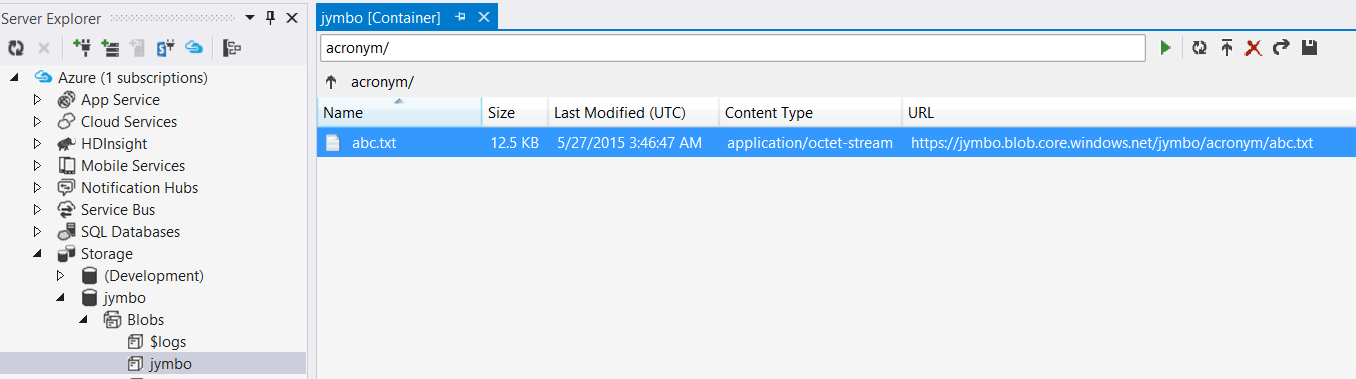
If we look in our Azure storage account we should now see that file:
Figure 15. Azure Storage
We can use our server explorer in Visual Studio to download the file and verify the contents:

Figure 16. Visual Studio Server Explorer

Hit the Save As Button and open in a local directory:

Figure 17. Download File from Blob Storage
Figure 18. abc.txt Contents
     Keep in mind that whenever you pass abc it will overwrite the existing abc.txt file in blob storage. This 
example could always be expanded on to pass a file name parameter to get around this if desired. If you 
pass parameter xyz for acronym, it will create a blob called acronym/xyz.txt and so on.

Saturday, November 30, 2013

Consuming XML Feeds of Customer Sat Survey Questions and Responses from Market Tool's REST API Using SSIS

     I had a package, built by my good buddy Gordon, that pulled down customer sat survey questions and responses from Market Tool's Customer Sat REST API and wrote the XML to files. I thought I'd build upon this and just write the data straight to staging tables and cut out the XML file "middle man". Now while this API doesn't have much functionality, it's very easy to use. The control flow for this package is going to look something like this:

Figure 1. Control Flow
     Here we are loading the questions before the answers, but there is no reason why you couldn't remove this precedence constraint and load them in parallel. We first need to create some SSIS variables that will configure our calls to the REST API:

Figure 2. SSIS Variables
userName, password and surveryId is provided by Market Tools. These provide authentication and tells the API which survey you want data for.  The surveyQuestionsUri is the uri for pulling back questions and upload variables for a particular survey id. The questions are what is asked the customer in the survey, while the upload variables are metadata about the transaction the survey was for. These could be things like customer email address, the transaction identifier, identifier for the employee involved in the transaction, etc.  The surveyResponsesUri is the uri for pulling back the answers to the questions asked on the survey by a particular customer for a transaction. The uri requires, the survey id of the survey you want answers for, the begin and end date range for the time the survey was responded to, and the page number of the responses. Since the web service will only return 200 responses at a time, if the time frame brings back more than 200 responses, you will have more than one page of data to sift through. The timeout variable tells the package how many milliseconds to wait for a response from the web service before timing out. I defaulted this to 1 minute.

     Our first sequence container has a data flow that will process our questions and upload variables. Each question and upload variable may be multiple-choice, the API also provides these with the response. So we need to make sure to create outputs for these as well. The data flow for this will look something like this:


Figure 3. Questions and Upload Variable Data Flow

     To begin, let's drag a script component onto the design surface of the data flow. When prompted for type, choose source:


Figure 4. Script Component Source

We're going to need to provide this script component with some of the variables we created. Make sure to select password, surveyId, surveyQuestionsUri, userName  and timeout as ReadOnlyVariablesUser::password,User::surveyId,User::surveyQuestionsUri,User::userName,User::timeout


Figure 5. Script Component Script Screen


     With this done, we can start creating our 4 outputs for this script component. The Question and Question Choices will output the survey questions asked, along side the choices available to multiple choice questions:


Figure 6. Script Component Inputs and Outputs Screen for Questions

Next, we can create the outputs for the upload variables and their choices:


Figure 7. Script Component Inputs and Outputs Screen for Upload Variables
 We are going to derive these outputs from the XML returned from the survey questions uri. Both questions and upload variables are returned in the same XML which comes in this format:


<SurveyProperties xmlns="http://apiconnectservices.Customersat.com" xmlns:i="http://www.w3.org/2001/XMLSchema-instance">
       <CustomerSampleUploadVariables>
              <CSUV>
                     <ID>134587</ID>
                     <TypeID>12</TypeID>
                     <SeqNumber>1</SeqNumber>
                     <Text>CUSTOMER_EMAIL_ADDRESS</Text>
              </CSUV>
              <CSUV>
                     <ID>145526</ID>
                     <TypeID>10</TypeID>
                     <SeqNumber>50</SeqNumber>
                     <Text>LANGUAGE_FLAG</Text>
                     <Choices>
                           <Choice>
                                  <OrderNo>1</OrderNo>
                                  <Text>1</Text>
                                  <ChoiceType>1</ChoiceType>
                           </Choice>
                           <Choice>
                                  <OrderNo>2</OrderNo>
                                  <Text>2</Text>
                                  <ChoiceType>1</ChoiceType>
                           </Choice>
                           <Choice>
                                  <OrderNo>3</OrderNo>
                                  <Text>3</Text>
                                  <ChoiceType>1</ChoiceType>
                           </Choice>
                           <Choice>
                                  <OrderNo>4</OrderNo>
                                  <Text>4</Text>
                                  <ChoiceType>1</ChoiceType>
                           </Choice>
                           <Choice>
                                  <OrderNo>5</OrderNo>
                                  <Text>[blank]</Text>
                                  <ChoiceType>1</ChoiceType>
                           </Choice>
                     </Choices>
              </CSUV>
             
       </CustomerSampleUploadVariables>
       <Questions>
              <Question>
                     <ID>139875</ID>
                     <TypeID>2</TypeID>
                     <PageOrderNo>1</PageOrderNo>
                     <SeqNumber>3</SeqNumber>
                     <Text>Please choose your language preference.</Text>
                     <Choices>
                           <Choice>
                                  <OrderNo>1</OrderNo>
                                  <Text>English</Text>
                                  <ChoiceType>1</ChoiceType>
                           </Choice>
                           <Choice>
                                  <OrderNo>2</OrderNo>
                                  <Text>Français</Text>
                                  <ChoiceType>1</ChoiceType>
                           </Choice>
                     </Choices>
              </Question>
              <Question>
                     <ID>131902</ID>
                     <TypeID>4</TypeID>
                     <PageOrderNo>2</PageOrderNo>
                     <SeqNumber>4</SeqNumber>
                     <Text>
                           Rate Your Approval of Service
                     </Text>
                     <Choices>
                           <Choice>
                                  <OrderNo>1</OrderNo>
                                  <Text>1</Text>
                                  <Rating>1</Rating>
                           </Choice>
                           <Choice>
                                  <OrderNo>2</OrderNo>
                                  <Text>2</Text>
                                  <Rating>2</Rating>
                           </Choice>
                           <Choice>
                                  <OrderNo>3</OrderNo>
                                  <Text>3</Text>
                                  <Rating>3</Rating>
                           </Choice>
                           <Choice>
                                  <OrderNo>4</OrderNo>
                                  <Text>4</Text>
                                  <Rating>4</Rating>
                           </Choice>
                           <Choice>
                                  <OrderNo>5</OrderNo>
                                  <Text>5</Text>
                                  <Rating>5</Rating>
                           </Choice>
                           <Choice>
                                  <OrderNo>6</OrderNo>
                                  <Text>6</Text>
                                  <Rating>6</Rating>
                           </Choice>
                           <Choice>
                                  <OrderNo>7</OrderNo>
                                  <Text>7</Text>
                                  <Rating>7</Rating>
                           </Choice>
                           <Choice>
                                  <OrderNo>8</OrderNo>
                                  <Text>8</Text>
                                  <Rating>8</Rating>
                           </Choice>
                           <Choice>
                                  <OrderNo>9</OrderNo>
                                  <Text>9</Text>
                                  <Rating>9</Rating>
                           </Choice>
                           <Choice>
                                  <OrderNo>10</OrderNo>
                                  <Text>10</Text>
                                  <Rating>10</Rating>
                           </Choice>
                           <Choice>
                                  <OrderNo>11</OrderNo>
                                  <Text>NA</Text>
                                  <Rating>NA</Rating>
                           </Choice>
                     </Choices>
              </Question>
              <Question>
                     <ID>131918</ID>
                     <TypeID>2</TypeID>
                     <PageOrderNo>2</PageOrderNo>
                     <SeqNumber>17</SeqNumber>
                     <Text>Length of Time Before Call was Answered</Text>
                     <Choices>
                           <Choice>
                                  <OrderNo>1</OrderNo>
                                  <Text>I was never on hold</Text>
                                  <ChoiceType>1</ChoiceType>
                           </Choice>
                           <Choice>
                                  <OrderNo>2</OrderNo>
                                  <Text>Less than 1 minute</Text>
                                  <ChoiceType>1</ChoiceType>
                           </Choice>
                           <Choice>
                                  <OrderNo>3</OrderNo>
                                  <Text>1 to less than 5 minutes</Text>
                                  <ChoiceType>1</ChoiceType>
                           </Choice>
                           <Choice>
                                  <OrderNo>4</OrderNo>
                                  <Text>5 to less than 10 minutes</Text>
                                  <ChoiceType>1</ChoiceType>
                           </Choice>
                           <Choice>
                                  <OrderNo>5</OrderNo>
                                  <Text>10 minutes or longer</Text>
                                  <ChoiceType>1</ChoiceType>
                           </Choice>
                           <Choice>
                                  <OrderNo>6</OrderNo>
                                  <Text>Don’t know</Text>
                                  <ChoiceType>1</ChoiceType>
                           </Choice>
                     </Choices>
              </Question>
              <Question>
                     <ID>258464</ID>
                     <TypeID>6</TypeID>
                     <PageOrderNo>7</PageOrderNo>
                     <SeqNumber>17</SeqNumber>
                     <Text>Please provide any additional feedback</Text>
              </Question>
       </Questions>
</SurveyProperties>

     In order for us to bring this XML data into our data flow outputs, we're going to need to deserialize them into classes.  To generate these classes you can copy your XML to your clipboard, open up a .net 4.5 C# project in Visual Studio 2012, then go to edit-->paste special-->paste XML as classes. This will generate all the classes your XML will deserialize into. We will use these classes in our code. So to begin coding let's go back to the script screen, click on the edit script button and paste the following code:

#region Namespaces
using System;
using System.Data;
using System.IO;
using System.Net;
using System.Text;
using System.Threading;
using System.Threading.Tasks;
using System.Windows.Forms;
using System.Xml.Serialization;
using Microsoft.SqlServer.Dts.Pipeline.Wrapper;
using Microsoft.SqlServer.Dts.Runtime.Wrapper;
#endregion

#region Class
/// <summary>
/// This is the class to which to add your code.  Do not change the name, attributes, or parent
/// of this class.
/// </summary>
[Microsoft.SqlServer.Dts.Pipeline.SSISScriptComponentEntryPointAttribute]
public class ScriptMain : UserComponent
{
    /// <summary>
    /// Authentication string for Web Service Authentication
    /// </summary>
    public string Authentication
    {
        get
        {
            byte[] bytes = Encoding.Default.GetBytes(String.Format("{0} : {1}", Variables.userName, Variables.password));
            string _authentication = "Basic " + Convert.ToBase64String(bytes);
            return _authentication;
        }
    }


    #region Methods
    public override void CreateNewOutputRows()
    {
        //Data flow interface
        IDTSComponentMetaData100 compMetadata = this.ComponentMetaData;
        SurveyProperties xmlResponse = null;

        try
        {
            //Get questions from web service
            SurveyProperties outPutQuestions = GetSurveyQuestions(Variables.surveyId, compMetadata, xmlResponse);

            //We use a task factory to make sure we don't exit before all output buffers are done
            Task[] tasks = new Task[2];

            tasks[0] = Task.Factory.StartNew(() => OutPutQuestions(outPutQuestions, compMetadata));
            tasks[1] = Task.Factory.StartNew(() => OutPutUploadVariables(outPutQuestions.CustomerSampleUploadVariables, compMetadata));
            //Wait for all tasks to finish
            Task.WaitAll(tasks);
            InfoComponent(String.Format("All data completed being sent to output buffers [{0}]"DateTime.Now.ToString("yyyy-MM-dd HH:mm:ss.fff")), compMetadata);
        }
        catch (NullReferenceException)
        {
            InfoComponent(String.Format("No Questions Have Been Returned from Web Service [{0}]",DateTime.Now.ToString("yyyy-MM-dd HH:mm:ss.fff")), compMetadata);
        }
        catch (Exception e)
        {
            FailComponent(e.ToString(), compMetadata);
        }

    }
    /// <summary>
    /// Add questions and question choices to their output buffers
    /// </summary>
    /// <param name="outPutQuestions">The array of questions</param>
    public void OutPutQuestions(SurveyProperties outPutQuestions, IDTSComponentMetaData100 compMetadata)
    {

        if (outPutQuestions != null)
        {
            InfoComponent(String.Format("Sending questions to the output buffer [{0}]"DateTime.Now.ToString("yyyy-MM-dd HH:mm:ss.fff")), compMetadata);
            //Output Questions
            foreach (SurveyPropertiesQuestion quest in outPutQuestions.Questions)
            {
                QuestionsBuffer.AddRow();
                QuestionsBuffer.ID = quest.id;
                QuestionsBuffer.TYPEID = quest.typeID;
                QuestionsBuffer.SEQUENCENUMBER = quest.seqNumber;
                QuestionsBuffer.TEXT = quest.text;
                QuestionsBuffer.PAGEORDERNUMBER = quest.pageOrderNo;
                QuestionsBuffer.TYPETEXT = GetQuestionTypeDesc(quest.typeID);

                if (quest.Choices != null)
                {
                    //Ouput Question Choices
                    foreach (SurveyPropertiesQuestionChoice choice in quest.Choices)
                    {
                        QuestionChoicesBuffer.AddRow();
                        QuestionChoicesBuffer.QUESTIONID = quest.id;
                        QuestionChoicesBuffer.CHOICETYPE = choice.choiceType;
                        QuestionChoicesBuffer.ORDERNUMBER = choice.orderNo;
                        QuestionChoicesBuffer.RATING = choice.rating;
                        QuestionChoicesBuffer.TEXT = choice.text;

                    }
                }
            }
            InfoComponent(String.Format("Finished sending questions to the output buffer [{0}]"DateTime.Now.ToString("yyyy-MM-dd HH:mm:ss.fff")), compMetadata);
        }

    }
    /// <summary>
    /// Adds upload variables and their choices to their output buffers
    /// </summary>
    /// <param name="uVariables">The array of upload variables</param>
    public void OutPutUploadVariables(SurveyPropertiesCSUV[] uVariables, IDTSComponentMetaData100 compMetadata)
    {

        if (uVariables != null)
        {
            InfoComponent(String.Format("Sending upload variables to the output buffer [{0}]"DateTime.Now.ToString("yyyy-MM-dd HH:mm:ss.fff")), compMetadata);
            foreach (SurveyPropertiesCSUV csuv in uVariables)
            {
                UploadVariablesBuffer.AddRow();
                UploadVariablesBuffer.ID = csuv.id;
                UploadVariablesBuffer.SEQUENCENUMBER = csuv.seqNumber;
                UploadVariablesBuffer.TEXT = csuv.text;
                UploadVariablesBuffer.TYPEID = csuv.typeID;


                if (csuv.Choices != null)
                {
                    foreach (SurveyPropertiesCSUVChoice choice in csuv.Choices)
                    {
                        UploadVariableChoicesBuffer.AddRow();
                        UploadVariableChoicesBuffer.ORDERNUMBER = choice.orderNo;
                        UploadVariableChoicesBuffer.TEXT = choice.text;
                        UploadVariableChoicesBuffer.CHOICETYPE = choice.choiceType;
                        UploadVariableChoicesBuffer.UPLOADVARIABLEID = csuv.id;
                    }
                }

            }
            InfoComponent(String.Format("Finished sending upload variables to the output buffer [{0}]"DateTime.Now.ToString("yyyy-MM-dd HH:mm:ss.fff")), compMetadata);
        }

    }

    /// <summary>
    /// Connects to the Market Tools Web Service
    /// </summary>
    /// <param name="uri">The uri to call</param>
    /// <returns>The response object</returns>
    private HttpWebResponse GetWebResponse(string uri)
    {

        HttpWebRequest httpWReq = (HttpWebRequest)HttpWebRequest.Create(uri);
        httpWReq.Method = "GET";
        httpWReq.ContentType = "text/xml";
        httpWReq.Headers["Authorization"] = Authentication;
        httpWReq.Timeout = Variables.timeout;
        return (HttpWebResponse)httpWReq.GetResponse();
    }

    /// <summary>
    /// Gets the Survey Questions with choices and Upload variable Questions.
    /// </summary>
    /// <param name="surveyID">The identifier of the survey</param>
    public SurveyProperties GetSurveyQuestions(string surveyID, IDTSComponentMetaData100 compMetadata, SurveyProperties xmlResponse)
    {
        try
        {
            //Connect to web service
            InfoComponent(String.Format("Connecting to web service [{0}]"DateTime.Now.ToString("yyyy-MM-dd HH:mm:ss.fff")), compMetadata);
            HttpWebResponse httpWResp = GetWebResponse(string.Format(Variables.surveyQuestionsUri, surveyID));
            //Test the connection
            if (httpWResp.StatusCode == HttpStatusCode.OK)
            {
                InfoComponent(String.Format("Connected to web service, getting response [{0}]"DateTime.Now.ToString("yyyy-MM-dd HH:mm:ss.fff")), compMetadata);
                Stream responseStream = httpWResp.GetResponseStream();

                //Set xmlString using a stream reader
                using (StreamReader reader = new StreamReader(responseStream))
                {
                    //Deserialize our XML
                    InfoComponent(String.Format("Deserializing XML [{0}]"DateTime.Now.ToString("yyyy-MM-dd HH:mm:ss.fff")), compMetadata);
                    XmlSerializer sr = new XmlSerializer(typeof(SurveyProperties));
                    xmlResponse = (SurveyProperties)sr.Deserialize(reader);
                }

            }

            //Output connection error message
            else
            {
                FailComponent(String.Format("Http Error! {0}:[{1}]", httpWResp.StatusCode.ToString(), DateTime.Now.ToString("yyyy-MM-dd HH:mm:ss.fff")), compMetadata);
            }

        }
        catch (Exception ex)
        {
            FailComponent(String.Format(ex.Message+" [{0}]",DateTime.Now.ToString("yyyy-MM-dd HH:mm:ss.fff")), compMetadata);

        }
        return xmlResponse;
    }

    /// <summary>
    /// Returns the description for the question type id passed
    /// </summary>
    /// <param name="typeID">The identifier for the question type</param>
    private string GetQuestionTypeDesc(int typeID)
    {
        string typeDesc = "";

        switch (typeID)
        {
            case 1:
                {
                    typeDesc = "Text";
                    break;
                }
            case 2:
                {
                    typeDesc = "Choose One";
                    break;
                }
            case 3:
                {
                    typeDesc = "Choose All That Apply";
                    break;
                }
            case 4:
                {
                    typeDesc = "Rating";
                    break;
                }
            case 5:
                {
                    typeDesc = "Block of Text";
                    break;
                }
            case 6:
                {
                    typeDesc = "Multi-Line Text";
                    break;
                }
            case 7:
                {
                    typeDesc = "Bold Block of Text";
                    break;
                }
            case 8:
                {
                    typeDesc = "Real Time Alert Multi-Line Text";
                    break;
                }
            case 9:
                {
                    typeDesc = "Uploaded Variable Text";
                    break;
                }
            case 10:
                {
                    typeDesc = "Uploaded Variable Choose One";
                    break;
                }
            case 11:
                {
                    typeDesc = "Uploaded Variable Rating";
                    break;
                }
            case 12:
                {
                    typeDesc = "Uploaded Variable Email";
                    break;
                }
            case 13:
                {
                    typeDesc = "Uploaded Variable Date";
                    break;
                }
            case 14:
                {
                    typeDesc = "Display Upload Variable";
                    break;
                }
            case 15:
                {
                    typeDesc = "Upload Variable Number";
                    break;
                }
            case 16:
                {
                    typeDesc = "Number";
                    break;
                }
            case 17:
                {
                    typeDesc = "Upload Variable Code ID";
                    break;
                }

        }
        return typeDesc;
    }

    /// <summary>Outputs an Error</summary>
    /// <param name="errorMsg">The error message to send to the UI</param>
    private void FailComponent(string errorMsg, IDTSComponentMetaData100 compMetadata)
    {
        bool fail = false;
        compMetadata.FireError(1, compMetadata.Name, errorMsg, "", 0, out fail);
    }
    /// <summary>Outputs an information message/// </summary>
    /// <param name="errorMsg">The no data returned message</param>
    private void InfoComponent(string errorMsg, IDTSComponentMetaData100 compMetadata)
    {
        bool fail = false;
        compMetadata.FireInformation(1, compMetadata.Name, errorMsg, "", 0, ref fail);
    }
    #endregion
}
#endregion

#region Question XML Classes

/// <remarks/>
[XmlTypeAttribute(AnonymousType = true, Namespace = "http://apiconnectservices.Customersat.com")]
[XmlRootAttribute(Namespace = "http://apiconnectservices.Customersat.com", IsNullable = false)]
public partial class SurveyProperties
{
    [XmlArrayItemAttribute("CSUV", IsNullable = false)]
    public SurveyPropertiesCSUV[] CustomerSampleUploadVariables;

    [XmlArrayItemAttribute("Question", IsNullable = false)]
    public SurveyPropertiesQuestion[] Questions;
}
/// <remarks/>
[XmlTypeAttribute(AnonymousType = true, Namespace = "http://apiconnectservices.Customersat.com")]
public partial class SurveyPropertiesCSUV
{
    [XmlElement("ID")]
    public int id;

    [XmlElement("TypeID")]
    public byte typeID;

    [XmlElement("SeqNumber")]
    public byte seqNumber;

    [XmlElement("Text")]
    public string text;

    [XmlArrayItemAttribute("Choice", IsNullable = false)]
    public SurveyPropertiesCSUVChoice[] Choices;
}

/// <remarks/>
[XmlTypeAttribute(AnonymousType = true, Namespace = "http://apiconnectservices.Customersat.com")]
public partial class SurveyPropertiesQuestion
{
    [XmlElement("ID")]
    public int id;

    [XmlElement("TypeID")]
    public byte typeID;

    [XmlElement("PageOrderNo")]
    public byte pageOrderNo;

    [XmlElement("SeqNumber")]
    public byte seqNumber;

    [XmlElement("Text")]
    public string text;

    [XmlArrayItemAttribute("Choice", IsNullable = false)]
    public SurveyPropertiesQuestionChoice[] Choices;

}

/// <remarks/>
[XmlTypeAttribute(AnonymousType = true, Namespace = "http://apiconnectservices.Customersat.com")]
public partial class SurveyPropertiesQuestionChoice
{
    [XmlElement("OrderNo")]
    public byte orderNo;

    [XmlElement("Text")]
    public string text;

    [XmlElement("Rating")]
    public string rating;

    [XmlElement("ChoiceType")]
    public byte choiceType;

    [XmlIgnoreAttribute()]
    public bool choiceTypeSpecified;

}
[XmlTypeAttribute(AnonymousType = true, Namespace = "http://apiconnectservices.Customersat.com")]
public partial class SurveyPropertiesCSUVChoice
{
    [XmlElement("OrderNo")]
    public byte orderNo;

    [XmlElement("Text")]
    public string text;

    [XmlElement("ChoiceType")]
    public byte choiceType;
}

#endregion


     Now let's step through this code and explain a little of what's going on here. We call 
//Get questions from web service
SurveyProperties outPutQuestions = GetSurveyQuestions(Variables.surveyIdcompMetadataxmlResponse); which will call our web service, deserialize our XML into classes and return an object that has all of our data. Since we have 2 sets of outputs, that will be executing in different scopes, I created a TaskFactory for these to run in. The reason for this is that because the outputs for these 2 pieces of data don't operate within the same scope, as soon as one finishes it will call SetEndOfRowSet(). According to the documentation on this "Data flow components call this method when they have finished adding rows to an Output PipelineBuffer. Calling SetEndOfRowset notifies the data flow engine that a component has finished adding rows to the PipelineBuffer. The SetEndOfRowset method then sets the value of the EndOfRowsetproperty to true on the final buffer." This means that as soon as one of the output buffers calls this method, the script component will not wait for the other output to run/finish before stopping. Thus, if you called the methods to populate these outputs(OutPutQuestions() and OutPutUploadVariables) synchronously you would only get data out of the first output method called. If you called these asynchronously, it would turn into a race for whatever output finished first to call SetEndOfRowset() and that output would get data while the other wouldn't. To solve this, we add both of these outputs to tasks, have these tasks start within the context of a task factory and runs them asynchronously. We call the WaitAll() method of the task factory to force all tasks to finish before we break.

     Let's save, build and run this sequence container to see what our question data looks like in data viewers:


Figure 8. Question Data Viewers

    We can track the execution on the progress tab and see that both of these outputs are running in parallel:


Figure 9. Questions Progress

     With questions done, we can move onto the responses data flow. This will output the answers to the survey questions asked of customers. The data flow for survey responses is going to look like this:


Figure 10. Responses Data Flow
     
     To start this one, drag a script component onto the design surface of the data flow. When prompted, select source:


Figure 11. Script Component Type
     On the script screen make sure to add password, responseEndDate, responseStartDate, surveyId, surveyResponseUri, userName and timeout as ReadOnlyVariables, User::password,User::responseEndDate,User::responseStartDate,User::surveyId,User::surveyResponsesUri,User::userName,User::timeout


Figure 12. Script Component Script Screen

Next, we go to the Inputs and Outputs screen to create an output for our survey responses:


Figure 13. Script Component Inputs and Outputs Screen for Responses

 We are going to derive these outputs from the XML returned from the survey responses uri. Responses are returned in an XML format that matches this:


<FeedbackResponse xmlns="http://apiconnectservices.Customersat.com">
       <SurveyProperties ID="12345">
              <FeedbackReportFromDate>2013-05-15T00:00:00</FeedbackReportFromDate>
              <FeedbackReportToDate>3000-01-01T00:00:00</FeedbackReportToDate>
       </SurveyProperties>
       <Feedback>
              <Page IsLastPage="true">1</Page>
              <Response ID="42835517" ResponseDateTime="2013-05-15T03:47:43.63">
                     <Value ID="134587">samplecustomeremail@sampleemail.org</Value>
                     <Value ID="133861">123476</Value>
                     <Value ID="133862" ChoiceOrderNo="5972">1102400</Value>
                     <Value ID="134588" ChoiceOrderNo="6476">Customer A</Value>
                     <Value ID="134589">2013-05-10 00:00:00</Value>
                     <Value ID="134663">10:52:12</Value>
                     <Value ID="133864">
                     </Value>
                     <Value ID="134664">
                     </Value>
                     <Value ID="135833" ChoiceOrderNo="10">Dispatch</Value>
                     <Value ID="134591" ChoiceOrderNo="9056">0000000000</Value>
                     <Value ID="134592" ChoiceOrderNo="9">[blank]</Value>
                     <Value ID="134593" ChoiceOrderNo="164">Product A</Value>
                     <Value ID="134594">Bob</Value>
                     <Value ID="134595">Smith</Value>
                     <Value ID="134596" ChoiceOrderNo="35">Manager</Value>
                     <Value ID="134597">
                     </Value>
                     <Value ID="134646">
                     </Value>
                     <Value ID="134647">7ST</Value>
                     <Value ID="134648">PHILADELPHIA</Value>
                     <Value ID="134649" ChoiceOrderNo="26">PA</Value>
                     <Value ID="134961">19104</Value>
                     <Value ID="135832" ChoiceOrderNo="90">Eastern Region</Value>
                     <Value ID="134651" ChoiceOrderNo="31">US</Value>
                     <Value ID="134652" ChoiceOrderNo="6">[blank]</Value>
                     <Value ID="134653" ChoiceOrderNo="16">[blank]</Value>
                     <Value ID="134654" ChoiceOrderNo="18">[blank]</Value>
                     <Value ID="134655" ChoiceOrderNo="9">[blank]</Value>
                     <Value ID="134656" ChoiceOrderNo="185">[blank]</Value>
                     <Value ID="134657" ChoiceOrderNo="3551">[blank]</Value>
                     <Value ID="134658" ChoiceOrderNo="3">[blank]</Value>
                     <Value ID="134659" ChoiceOrderNo="6">Medium</Value>
                     <Value ID="134660" ChoiceOrderNo="8">[blank]</Value>
                     <Value ID="134661" ChoiceOrderNo="305034">8000605204</Value>
                     <Value ID="178743" ChoiceOrderNo="874">wneal</Value>
                     <Value ID="179384">
                     </Value>
                     <Value ID="179385">
                     </Value>
                     <Value ID="179386">
                     </Value>
                     <Value ID="179387">
                     </Value>
                     <Value ID="179388">
                     </Value>
                     <Value ID="179389">
                     </Value>
                     <Value ID="179390">
                     </Value>
                     <Value ID="179391">
                     </Value>
                     <Value ID="179392">
                     </Value>
                     <Value ID="179393">
                     </Value>
                     <Value ID="179394">
                     </Value>
                     <Value ID="179395">
                     </Value>
                     <Value ID="262650" ChoiceOrderNo="1">Y</Value>
                     <Value ID="131902" ChoiceOrderNo="10" Rating="10">10</Value>
                     <Value ID="131903" ChoiceOrderNo="10" Rating="10">10</Value>
                     <Value ID="131904" ChoiceOrderNo="10" Rating="10">10</Value>
                     <Value ID="131906" ChoiceOrderNo="10" Rating="10">10</Value>
                     <Value ID="131907" ChoiceOrderNo="10" Rating="10">10</Value>
                     <Value ID="131909" ChoiceOrderNo="10" Rating="10">10</Value>
                     <Value ID="131910" ChoiceOrderNo="10" Rating="10">10</Value>
                     <Value ID="131911" ChoiceOrderNo="10" Rating="10">10</Value>
                     <Value ID="131912" ChoiceOrderNo="10" Rating="10">10</Value>
                     <Value ID="257799" ChoiceOrderNo="10" Rating="10">10</Value>
                     <Value ID="257806" ChoiceOrderNo="2">1 hour to less than 4</Value>
                     <Value ID="132068" ChoiceOrderNo="3">Yes, more than once</Value>
                     <Value ID="132069" ChoiceOrderNo="10" Rating="10">10</Value>
                     <Value ID="145548" ChoiceOrderNo="10" Rating="10">10</Value>
                     <Value ID="145549" ChoiceOrderNo="1" Rating="4">Definitely would</Value>
                     <Value ID="145550" ChoiceOrderNo="1" Rating="4">Definitely would</Value>
                     <Value ID="131916" ChoiceOrderNo="10" Rating="10">10</Value>
                     <Value ID="131894" ChoiceOrderNo="1">Phone</Value>
                     <Value ID="132075" ChoiceOrderNo="6">Manager</Value>>
              </Response>
       </Feedback>
</FeedbackResponse>

     Just like with the question XML, we need to create classes to deserialize the response XML into. You can do the same as the question XML and copy and paste into a .net 4.5 C# project by pasting XML as classes. Now that we have our XML classes, we can include them in our code. Go back to the script screen, click on the edit script button and we can start coding. 


#region Namespaces
using System;
using System.Data;
using System.IO;
using System.Net;
using System.Text;
using System.Windows.Forms;
using System.Xml.Serialization;
using Microsoft.SqlServer.Dts.Pipeline.Wrapper;
using Microsoft.SqlServer.Dts.Runtime.Wrapper;
#endregion

/// <summary>
/// This is the class to which to add your code.  Do not change the name, attributes, or parent
/// of this class.
/// </summary>
[Microsoft.SqlServer.Dts.Pipeline.SSISScriptComponentEntryPointAttribute]
public class ScriptMain : UserComponent
{
    /// <summary>
    /// Authentication string for Web Service Authentication
    /// </summary>
    public string Authentication
    {
        get
        {
            byte[] bytes = Encoding.Default.GetBytes(String.Format("{0} : {1}", Variables.userName, Variables.password));
            string _authentication = "Basic " + Convert.ToBase64String(bytes);
            return _authentication;
        }
    }

    /// <summary>
    /// Outputs rows to the result output buffer
    /// </summary>
    public override void CreateNewOutputRows()
    {
        //Data flow interface
        IDTSComponentMetaData100 compMetadata = this.ComponentMetaData;
        FeedbackResponse xmlResponse = null;
        int pageNumber=1;
        FeedbackResponse outPutResults;


        try
        {
            do
            {
                outPutResults = GetSurveyResults(compMetadata, xmlResponse, pageNumber);

                if (outPutResults.Feedback.Response != null)
                {
                    InfoComponent(String.Format("Sending rows to the results output buffer for page {0} [{1}]", pageNumber, DateTime.Now.ToString("yyyy-MM-dd HH:mm:ss.fff")), compMetadata);

                    //Output Results
                    foreach (FeedbackResponseFeedbackResponse fb in outPutResults.Feedback.Response)
                    {
                        if (fb.Value != null)
                        {
                            foreach (FeedbackResponseFeedbackResponseValue value in fb.Value)
                            {
                                ResultsBuffer.AddRow();
                                ResultsBuffer.SURVEYID = Convert.ToInt32(Variables.surveyId);
                                ResultsBuffer.RESPONSEID = fb.ID;
                                ResultsBuffer.RESPONSEDATETIME = fb.ResponseDateTime;
                                ResultsBuffer.QUESTIONID = value.ID;
                                ResultsBuffer.CHOICEORDERNUMBER = value.ChoiceOrderNo;
                                ResultsBuffer.RATING = value.Rating;
                                if (value.Value != null)
                                {
                                    ResultsBuffer.VALUE.AddBlobData(Encoding.ASCII.GetBytes(value.Value));
                                }
                                else
                                {
                                    ResultsBuffer.VALUE.SetNull();
                                }

                            }

                        }
                    }
                    InfoComponent(String.Format("Finished sending rows to the results output buffer for page {0} [{1}]", pageNumber, DateTime.Now.ToString("yyyy-MM-dd HH:mm:ss.fff")), compMetadata);
                }
                else
                {
                    throw new NullReferenceException();
                }
                pageNumber++;
                //Loop until we get the last page of returns or we got no responses
            } while (outPutResults.Feedback.Response != null && !outPutResults.Feedback.Page.IsLastPage);
            InfoComponent(String.Format("Finished sending all rows to the results output buffer [{0}]",  DateTime.Now.ToString("yyyy-MM-dd HH:mm:ss.fff")), compMetadata);
          
        }
        catch (NullReferenceException)
        {
            InfoComponent(String.Format("No Results Have Been Returned from Web Service {0}"DateTime.Now.ToString("yyyy-MM-dd HH:mm:ss.fff")), compMetadata);
        }

    }

    /// <summary>
    /// Connects to the Market Tools Web Service
    /// </summary>
    /// <param name="uri">The uri to call</param>
    /// <returns>The response object</returns>
    private HttpWebResponse GetWebResponse(string uri)
    {
        HttpWebRequest httpWReq = (HttpWebRequest)HttpWebRequest.Create(uri);
        httpWReq.Method = "GET";
        httpWReq.ContentType = "text/xml";
        httpWReq.Headers["Authorization"] = Authentication;
        httpWReq.Timeout = Variables.timeout;
        return (HttpWebResponse)httpWReq.GetResponse();
    }

    /// <summary>
    /// Gets the survey results
    /// </summary>
    /// <param name="surveyID">The identifier of the survey</param>
    public FeedbackResponse GetSurveyResults(IDTSComponentMetaData100 compMetadata, FeedbackResponse xmlResponse, int pageNumber)
    {
        try
        {

            string uri = string.Format(Variables.surveyResponsesUri, Variables.surveyId, "&", Variables.responseStartDate.ToShortDateString(), "&", Variables.responseEndDate.ToShortDateString(), "&", pageNumber.ToString());

            //Connect to web service
            InfoComponent(String.Format("Connecting to web service [{0}]"DateTime.Now.ToString("yyyy-MM-dd HH:mm:ss.fff")), compMetadata);
            HttpWebResponse httpWResp = GetWebResponse(uri);
            //Test the connection
            if (httpWResp.StatusCode == HttpStatusCode.OK)
            {
                InfoComponent(String.Format("Connected to web service, getting response for Page {0} [{1}]",pageNumber, DateTime.Now.ToString("yyyy-MM-dd HH:mm:ss.fff")), compMetadata);
                Stream responseStream = httpWResp.GetResponseStream();

                //Set xmlString using a stream reader
                using (StreamReader reader = new StreamReader(responseStream))
                {
                    //Deserialize our XML
                    InfoComponent(String.Format("Deserializing XML [{0}]"DateTime.Now.ToString("yyyy-MM-dd HH:mm:ss.fff")), compMetadata);
                    XmlSerializer sr = new XmlSerializer(typeof(FeedbackResponse));
                    xmlResponse = (FeedbackResponse)sr.Deserialize(reader);
                }

            }

            //Output connection error message
            else
            {
                FailComponent(String.Format("Http Error! {0}:[{1}]", httpWResp.StatusCode.ToString(), DateTime.Now.ToString("yyyy-MM-dd HH:mm:ss.fff")), compMetadata);
            }

        }
        catch (Exception ex)
        {
            FailComponent(String.Format(ex.Message+" [{0}]",DateTime.Now.ToString("yyyy-MM-dd HH:mm:ss.fff")), compMetadata);

        }
        return xmlResponse;
    }


    /// <summary>Outputs an error message</summary>
    /// <param name="errorMsg">The error message to send to the UI</param>
    private void FailComponent(string errorMsg, IDTSComponentMetaData100 compMetadata)
    {
        bool fail = false;
        compMetadata.FireError(1, compMetadata.Name, errorMsg, "", 0, out fail);
    }
    /// <summary>Outputs an information message</summary>
    /// <param name="errorMsg">The information message</param>
    private void InfoComponent(string errorMsg, IDTSComponentMetaData100 compMetadata)
    {
        bool fail = false;
        compMetadata.FireInformation(1, compMetadata.Name, errorMsg, "", 0, ref fail);
    }
}


#region Result XML Classes

[XmlTypeAttribute(AnonymousType = true, Namespace = "http://apiconnectservices.Customersat.com")]
[XmlRootAttribute(Namespace = "http://apiconnectservices.Customersat.com", IsNullable = false)]
public partial class FeedbackResponse
{
    [XmlElement("FeedbackResponse")]
    public FeedbackResponseSurveyProperties SurveyProperties;

    [XmlElement("Feedback")]
    public FeedbackResponseFeedback Feedback;
}

[XmlTypeAttribute(AnonymousType = true, Namespace = "http://apiconnectservices.Customersat.com")]
public partial class FeedbackResponseSurveyProperties
{
    [XmlElement("FeedbackReportFromDate")]
    public System.DateTime FeedbackReportFromDate;

    [XmlElement("FeedbackReportToDate")]
    public System.DateTime FeedbackReportToDate;

    [XmlAttribute("ID")]
    public ushort ID;

}

/// <remarks/>
[XmlTypeAttribute(AnonymousType = true, Namespace = "http://apiconnectservices.Customersat.com")]
public partial class FeedbackResponseFeedback
{
    [XmlElement("Page")]
    public FeedbackResponseFeedbackPage Page;

    [XmlElementAttribute("Response")]
    public FeedbackResponseFeedbackResponse[] Response;

}


[XmlTypeAttribute(AnonymousType = true, Namespace = "http://apiconnectservices.Customersat.com")]
public partial class FeedbackResponseFeedbackPage
{
    [XmlAttribute("IsLastPage")]
    public bool IsLastPage;

    [XmlTextAttribute()]
    public byte Value;
}


[XmlTypeAttribute(AnonymousType = true, Namespace = "http://apiconnectservices.Customersat.com")]
public partial class FeedbackResponseFeedbackResponse
{
    [XmlElementAttribute("Value")]
    public FeedbackResponseFeedbackResponseValue[] Value;

    [XmlAttribute("ID")]
    public int ID;

   [XmlAttribute("ResponseDateTime")]
    public System.DateTime ResponseDateTime;

}

/// <remarks/>
[XmlTypeAttribute(AnonymousType = true, Namespace = "http://apiconnectservices.Customersat.com")]
public partial class FeedbackResponseFeedbackResponseValue
{
    [XmlAttribute("ID")]
    public int ID;

    [XmlAttribute("ChoiceOrderNo")]
    public int ChoiceOrderNo;

    [System.Xml.Serialization.XmlIgnoreAttribute()]
    public bool ChoiceOrderNoSpecified;

    [XmlAttribute("Rating")]
    public string Rating;

    [XmlTextAttribute()]
    public string Value;

}
#endregion


     This script component only has one output, so we don't have to worry about any multi-threading for this one. We call  GetSurveyResults(compMetadata, xmlResponse, pageNumber); which will call the web service, desrialize our XML feed of responses and return us an object with our data in it. Then we loop through the FeedbackResponseFeedbackResponseValue array and output survey response records to the output buffer:

      foreach (FeedbackResponseFeedbackResponseValue value in fb.Value)
                            {
                                ResultsBuffer.AddRow();
                                ResultsBuffer.SURVEYID = Convert.ToInt32(Variables.surveyId);
                                ResultsBuffer.RESPONSEID = fb.ID;
                                ResultsBuffer.RESPONSEDATETIME = fb.ResponseDateTime;
                                ResultsBuffer.QUESTIONID = value.ID;
                                ResultsBuffer.CHOICEORDERNUMBER = value.ChoiceOrderNo;
                                ResultsBuffer.RATING = value.Rating;
                                ....

   This is all within a do while loop. Each response comes in a "page" of 200 survey responses. The response will tell you in an attribute on the Page element (IsLastPage) whether or not all the responses have been retrieved. While this is false we increment our pageNumber variable, and grab the next page of data from the web service

     Let's save, build and execute the response sequence container and see what we get in our data viewer:
  

Figure 14. Survey Responses Data Viewer
    
     You can also keep track of the progress on the progress tab:   

        
Figure 15. Responses Progress Tab          
     When all of the data is at it's database destinations, we can model it as such:

 
Figure 16. Destination Database Schema

     
     I had to create a supertype for this(QUESTIONS_VARIABLES), since both the primary key of QUESTIONS and the primary key of UPLOAD_VARIABLES both link to the foreign key of QUESTION_ID in RESPONSES (since a question can either be a question asked or an upload variable value returned with the survey response).